Expandable Train Station (Beginner-Friendly)
In my experience, the current logistics speed is more than enough to support multiple 900/min smelting setups. My own smelting factory currently runs over 40 blast furnaces; the logistical demand for a single ore type reaches 900/min, and the station's total throughput exceeds 3,000/min (Only the quantity of imports). Even so, it’s still nowhere near the maximum logistics load limit. This setup handles it so effortlessly that I have absolutely zero desire to upgrade to longer trains! XD
Placement Steps:
- Step 1: Place the entrance.
- Optional Step 1-2: Place additional entrance waiting slots. (In practice, the default 3 lanes are more than enough. You can add WAYPOINTS to extra slots and use them as a parking lot).
- Step 2: Place the stations. No upper limit—place as many as you need! Start with the 3-station module, then fill the remaining space with the 1-station module.
- Step 3: Place the station exit. 3 options available:
- Maintain the original entrance direction.
- Perpendicular to the original entrance direction.
- Not place an exit, this station will function as a terminus (dead-end station). Trains will exit from the same way they entered.
- Step 4: Select your preferred station layout and place the conveyor belts or pipelines.
Notes:
Designed for trains with a maximum length of 30 (perfect for beginners).
If a red "NO-STOP" zone appears, remember to dismiss/cancel it Unless you use long train(though it shouldn't normally happen).
This blueprint includes dedicated conveyor and pipeline configurations as listed below:
(Note: The numbers represent the max throughput per minute.
"-E" indicates the Electrified configuration, while its absence means the Standard rail configuration, which includes a train fuel pipeline.
"LOAD" or "UNLOAD" indicates the direction of travel; configurations without these tags use elevator transport for dual-purpose import/export. Please double-check the direction before placing!)
Bulk Logistics- U-1200
- U-1200-E
- U-1350-LOAD
- U-1350-UNLOAD
- U-1800-LOAD-E
- U-1800-UNLOAD-E
- U-3600-L110-LOAD-E
- U-3600-L110-UNLOAD-E
Flat Logistics
- F-1200
- F-1200-E
- F-1350-LOAD
- F-1350-UNLOAD
- F-1800-LOAD-E
- F-1800-UNLOAD-E
Liquid Logistics
- L-3600-LOAD
- L-3600-UNLOAD
- L-3600-LOAD-E
- L-3600-UNLOAD-E
Two versions of this blueprint are provided: Electrified and Standard Rail.
Update v2 : Optimized the design of the exit lines.
Update v3 : Optimized the design of the entrance lines.
Update v4 : Optimized the design of the entrance lines.
Update v5 : add 1-2-2 entrance waiting slots
Update V7: Changed the design of the station entrance by removing the U-turn loop, which was causing bottlenecks during high train traffic (currently around 70 trains).Because of this, the original 1-2-2 waiting slots are no longer recommended.
Update V8:added one-way version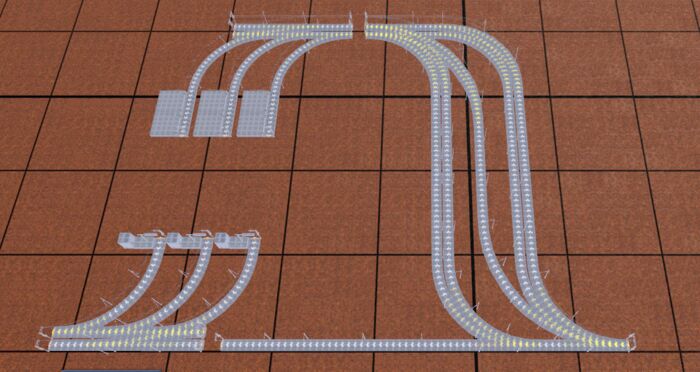
Update V9: added one-way long train version (8 wagons ) and Logistics
- U-3600-L110-LOAD-E
- U-3600-L110-UNLOAD-E
| Version | Released | Downloads | Copy |
|---|---|---|---|
| 9 Current | 4 days ago | 18 | |
| 8 | 6 days ago | 12 | |
| 7 | 21 days ago | 44 | |
| 6 | 25 days ago | 24 | |
| 5 | 1 month ago | 16 | |
| 4 | 1 month ago | 2 | |
| 3 | 1 month ago | 8 | |
| 2 | 1 month ago | 0 | |
| 1 | 1 month ago | 6 |
Paste it into the game: Blueprints → Import from string. The game fetches the blueprint itself, so the link is all you need.
On an older game build that doesn't take links? Copy the blueprint string instead: