This started as a report that seemed to be outside intended circumstances, but i've dug deeper and have uncovered a critical problem in how the game loads, one that may have only cropped up for me but could very well become a problem as modpacks grow larger.
At the very least, i believe this is worth taking a look at
Edit: found a workaround that worked the 2 times i tested it, added to the workaround section
edit 2: did more tests, the issue is with a specific mod's version of harmony, but it only appears due to mods not being pre-loaded when loading a game through the continue or load menus. at least, that's my current theory. i'll keep running tests if asked so check further down in the thread to see what's been uncovered
Edit 4:
Hi devs that might be reading this! This bug report covers 2 different problems.
- A bug with a version of harmony used in v0.5.0 of the cargo helicopter mod
- Loading saved games doesn't pre-load extra content, like DLC and mods, meaning the processes to load mods and the process to load the game happens at the same time. In some cases, this can cause problems as the two processes don't expect the other to be running leading to problems. This is the root cause of #1.
Please address whichever you think applies to you, and feel free to ask me to clarify/test things.
hopefully this is the last edit i'll make.
edit 5: nvm i'm going to change the title, " Game Crash when loading due to harmony interupting "Delayed deserialization" " -> " Loading saved game with mods causes mods and game to load at the same time "
end of edits
TL,DR: If a mod uses 0Harmony.dll, the harmony patching process can interrupt the game loading process at the "Delayed deserialization" stage and prevent core game systems from loading, causing a crash
RECREATION
- Exist on linux, playing the game through steam proton
- Add pique's Cargo helecopter mod to the load list (https://coigame.com/Mod/1102/Cargo-Helicopter)
- watch as the game freaks out after loading terrain while trying to initialize UI
- wait for the memory leak to cause a crash, or some failsafe to crash the game
I've attached a recording of the crash due to how strange it looks, it's the fail safe version as a crash window kicked in and shut down the game when the footage freezes
footage transcript (just in case):
- Starting on main menu, going to load a save
- open up the mod menu
- struggle for a moment to find where the cargo helecopters mod is, it is pre-enabled due to previously getting it working
- load the save
- loading proceeds normally until about 50%
- the background art goes a peach colour, the loading bar resets to about 25%, 2 parts of the HUD load in (the search bar and a spacer on the left), and the tips switch rapidly
- footage freezes as the game crashes itself
PRESUMED CAUSE
(please note: this was written before i discovered the loading bug, as such this is a surface level explanation)
As mentioned, i believe this is due to a strange interaction between the cargo helicopter mod and either the game or steam proton, due exclusively to this file
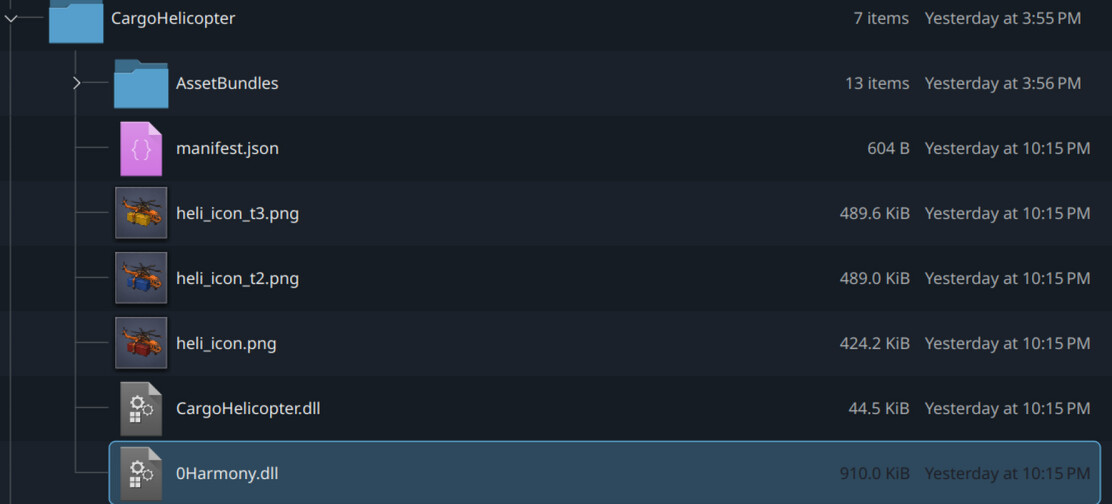
0Harmony.dll
I believe this for 2 reasons
- as the video shows, I have several other mods in use, not one other has this file included and i've never encountered this error before
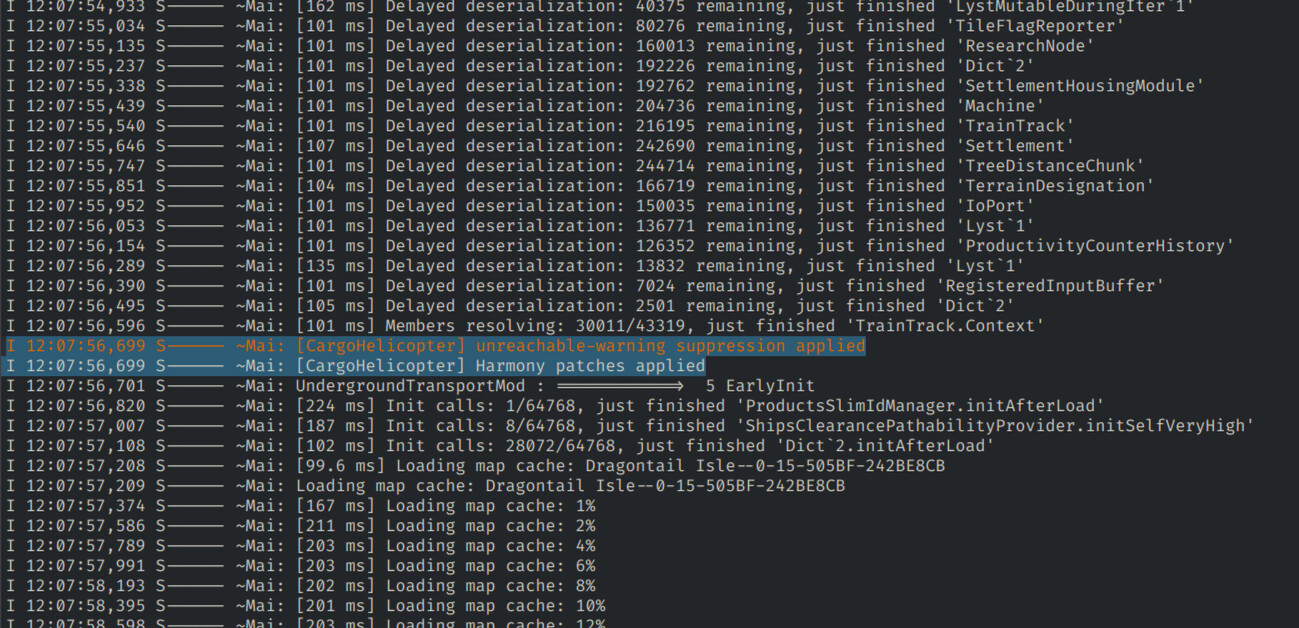
- the log files mention harmony patches, with the text reader i'm using displaying this in orange text, the only coloured text in the entire log file
I DO NOT BELIEVE THIS IS A MALICIOUS FILE
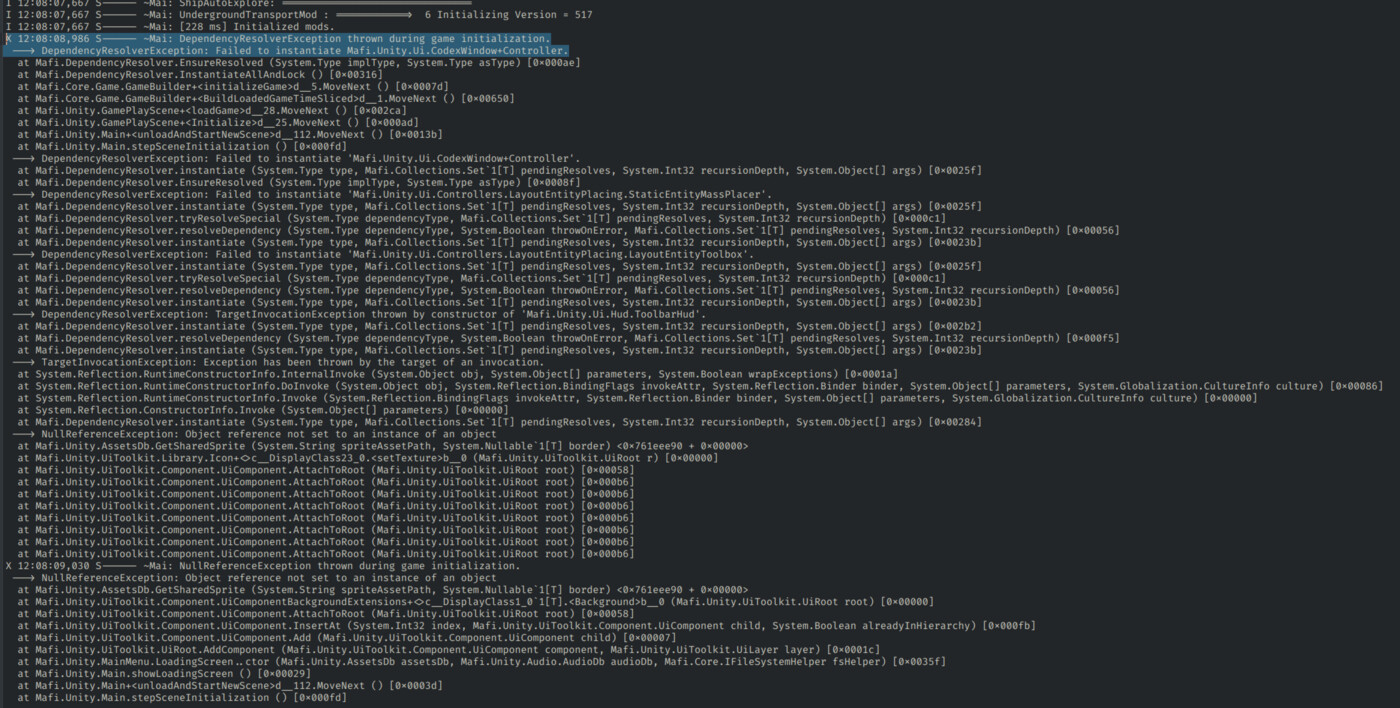
I have seen 0Harmony.dll before when modding kerbal space program, and never had issues with it there. But this is the first time i've seen it when modding Captain of Industry, and it's the only thing i've noticed being different with this mod compared to everything else. Not only that, looking in the logs reveals that the game crashed due to a GUI error, with mentions of failing to initialize a UI component.
DIGGING DEEPER
I did manage to get the aforementioned mod loaded once before, and wrote basically the rest of this report before going and looking at the log files for that instance, and i've noticed something worth mentioning.
I think this has something to do with when harmony kicks in its patches during the loading process. As shown in the above screenshot, harmony appears midway through a different mod's initialization, in a "Delayed deserialization" period. This interupt doesn't happen in the logs of the loaded instance, as this "Delayed deserialization" period finished before harmony applied patches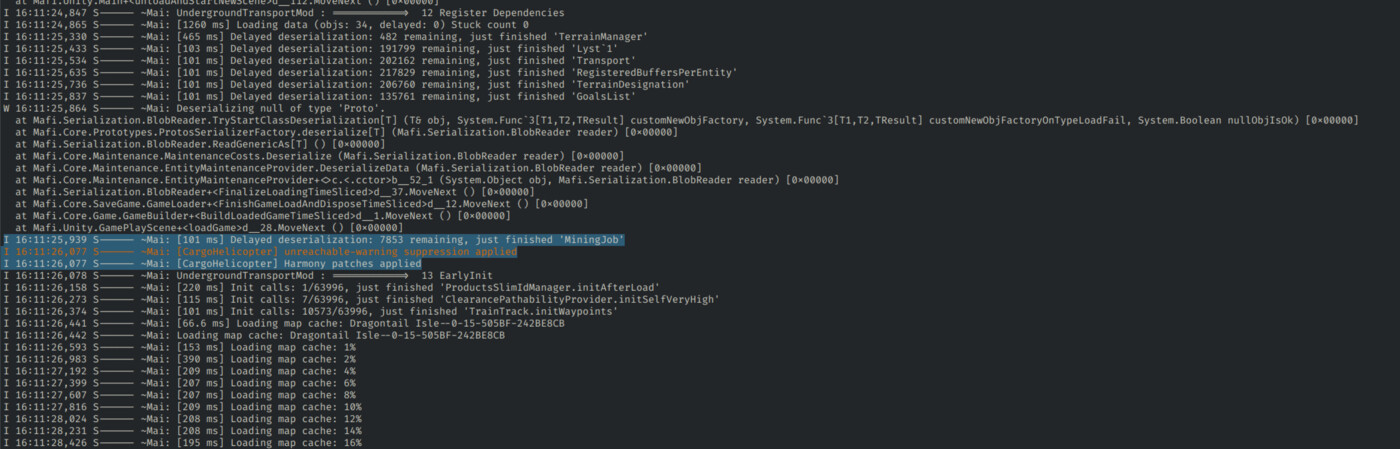
Comparing the two log files, it seems that a section of core game systems don't initialize in the crash version before harmony jumps in. The logs mention functions for "serealization", "maintenence", "game loader", "game builder", and "gameplay scene" that are completely missing from the crash version. It's possible that other functions were also cut off from initializing properly in this version, but none were critical to cause the game to crash.
My guess as to what is happening is that when the "delayed deserialization" period starts, harmony also starts up to add its patches. This doesn't happen instantly, either due to processing or a delay timer. if the "delayed deseralization" period takes too long however, harmony jumps in to interupt it. This prevents the period from properly finishing, leaving core game systems improperly set up. Which causes the game to tear itself apart upon trying to load the save.
WORKAROUNDS
This is a problem with how the game itself loads and interacts with harmony
If this happens, there is no consistent workaround
best bet is to just revert to a save before you added the mod that uses 0Harmony.dll, or try to remove unneeded mods to get the game to load faster.
EDIT: WORKAROUND FOUND!
Folow this handy dandy 3 step plan to load your save again
load into a sandbox save with all mods EXCEPT the mod(s) that use 0Harmony.dll
immediatly quit back to the title\
load into your savegame
tested twice and it's working! if i have to guess doing it like this pre-cashes some data from the mods meaning the deserealization takes less time, and so harmony doesn't interrupt it!
Edit 3: alternate (faster) workaround
- click "new game"
- select the mods you want to use
- press continue and wait for the loading screen to leave
- back out to the main menu
- load your save
Attached files
I have attached 2 log files to this report
26-07-11_12-07-28_0191.log is from a crash, made to document this issue. The harmony interrupt happens at line 253.
26-07-10_16-05-22_9458.log is from a loaded game, the 1 instance where i got the mod that includes harmony to work, and i have no idea how. the harmony interrupt happens at line 667.