Issue description
German Language Settings. Love the Game great Work <3.
The game could not be started. If the problem persists, please create a bug report.
System.Reflection.ReflectionTypeLoadException: Exception of type 'System.Reflection.ReflectionTypeLoadException' was thrown.
VTable setup of type IndustrialExpansion.Helper.CargoShipDryDock.CargoShipDryDockManager failed
at (wrapper managed-to-native) System.Reflection.Assembly.GetTypes(System.Reflection.Assembly,bool)
at System.Reflection.RuntimeAssembly.GetExportedTypes () [0x00000]
at Mafi.Core.Game.GameBuilder.TryInstantiateConfigs[T] (System.Collections.Generic.IEnumerable1[T] assembliesToScan, System.Collections.Generic.IEnumerable1[T] existingConfigs, System.Boolean throwOnError, Mafi.Collections.Lyst1[System.ValueTuple2[System.Reflection.Assembly,System.String]]& failedAssemblies) [0x00187]
at Mafi.Core.Game.GameBuilder.InstantiateConfigsOrThrow[T] (System.Collections.Generic.IEnumerable1[T] assembliesToScan, System.Collections.Generic.IEnumerable1[T] existingConfigs) [0x00000]
at Mafi.Core.Game.GameBuilder+<BuildLoadedGameTimeSliced>d__1.MoveNext () [0x001b8]
at Mafi.Unity.GamePlayScene+<loadGame>d__28.MoveNext () [0x002ca]
at Mafi.Unity.GamePlayScene+<Initialize>d__25.MoveNext () [0x000ad]
at Mafi.Unity.Main+<unloadAndStartNewScene>d__125.MoveNext () [0x00146]
at Mafi.Unity.Main.stepSceneInitialization () [0x00122]
System.TypeLoadException: VTable setup of type IndustrialExpansion.Helper.CargoShipDryDock.CargoShipDryDockManager failed
Game version: 0.8.8
Loaded mods: (Bagger 288 0.9.1), (Cargo Helicopter 0.20.2), (Industrial Expansion 1.0.5), (Underground Transport 6.2.0), (Gameplay++ 1.4.3), (Speed++ 1.1.6), (Storage++ 1.3.7), (Utilities++ 1.3.1)
Failed mods: none
Reproduction steps
Game version and build number
v0.8.8 (b627)
Which branch of the game are you on?
Stable
Operating system
Windows
Originally posted in German
### Issue description
German Language Settings. Love the Game great Work <3.\
Das Spiel konnte nicht gestartet werden. Wenn das Problem weiterhin besteht, erstelle bitte einen Fehlerbericht.
System.Reflection.ReflectionTypeLoadException: Exception of type 'System.Reflection.ReflectionTypeLoadException' was thrown.\
VTable setup of type IndustrialExpansion.Helper.CargoShipDryDock.CargoShipDryDockManager failed\
at (wrapper managed-to-native) System.Reflection.Assembly.GetTypes(System.Reflection.Assembly,bool)\
at System.Reflection.RuntimeAssembly.GetExportedTypes () \[0x00000\]\
at [Mafi.Core.Game](http://Mafi.Core.Game).GameBuilder.TryInstantiateConfigs\[T\] (System.Collections.Generic.IEnumerable`1[T] assembliesToScan, System.Collections.Generic.IEnumerable`1\[T\] existingConfigs, System.Boolean throwOnError, Mafi.Collections.Lyst`1[System.ValueTuple`2\[System.Reflection.Assembly,System.String\]\]& failedAssemblies) \[0x00187\]\
at [Mafi.Core.Game](http://Mafi.Core.Game).GameBuilder.InstantiateConfigsOrThrow\[T\] (System.Collections.Generic.IEnumerable`1[T] assembliesToScan, System.Collections.Generic.IEnumerable`1\[T\] existingConfigs) \[0x00000\]\
at [Mafi.Core.Game](http://Mafi.Core.Game).GameBuilder+<BuildLoadedGameTimeSliced>d__1.MoveNext () \[0x001b8\]\
at Mafi.Unity.GamePlayScene+<loadGame>d__28.MoveNext () \[0x002ca\]\
at Mafi.Unity.GamePlayScene+<Initialize>d__25.MoveNext () \[0x000ad\]\
at Mafi.Unity.Main+<unloadAndStartNewScene>d__125.MoveNext () \[0x00146\]\
at Mafi.Unity.Main.stepSceneInitialization () \[0x00122\]\
System.TypeLoadException: VTable setup of type IndustrialExpansion.Helper.CargoShipDryDock.CargoShipDryDockManager failed
Game version: 0.8.8\
Loaded mods: (Bagger 288 0.9.1), (Cargo Helicopter 0.20.2), (Industrial Expansion 1.0.5), (Underground Transport 6.2.0), (Gameplay++ 1.4.3), (Speed++ 1.1.6), (Storage++ 1.3.7), (Utilities++ 1.3.1)\
Failed mods: none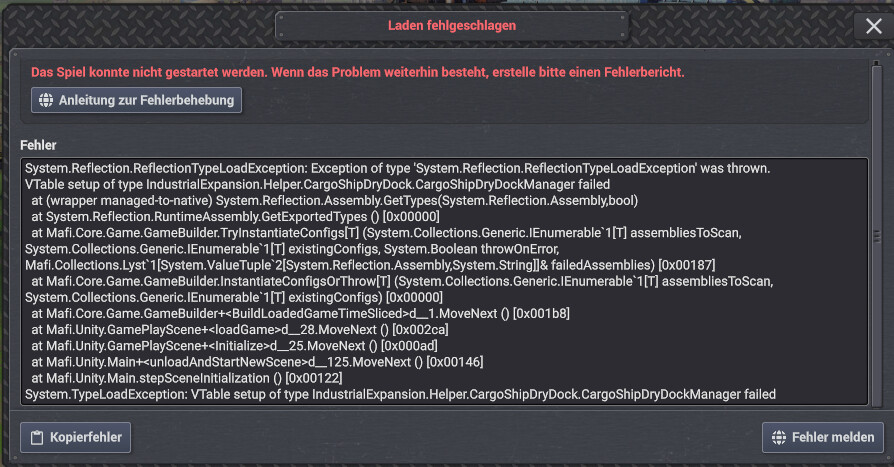
### Reproduction steps
{{clip:a0a3da69dbb5b40b6ad75906c79d5bfbd4032bef161feb801a1507bc0e3f4665}}
### Game version and build number
v0.8.8 (b627)
### Which branch of the game are you on?
Stable
### Operating system
Windows
