
NE: Keybinds v0.2.0
> Set keyboard shortcuts & enjoy instant access to your most frequented bottom toolbar actions.
Not Enough Keybinds
⌨️ Build Faster, Not Harder
NE:Keybinds—NEK—dynamically adds configurable keybinds for vanilla and modded toolbar menus, submenus, tools & items.
📜 Install Notes
All keybinds are registered through Keybind Framework v1.0.1 — so KF is REQUIRED
Updated for Captain of Industry 0.8.6a
🔧 Current Toolbar Binds
Escape Menu→Settings→Mod Keybinds→NE:Keybinds
•MENUS & SUBMENUS from Vanilla & Modded toolbar.
•TOOLS → Remove Surface, Paint Surface, Billboards.
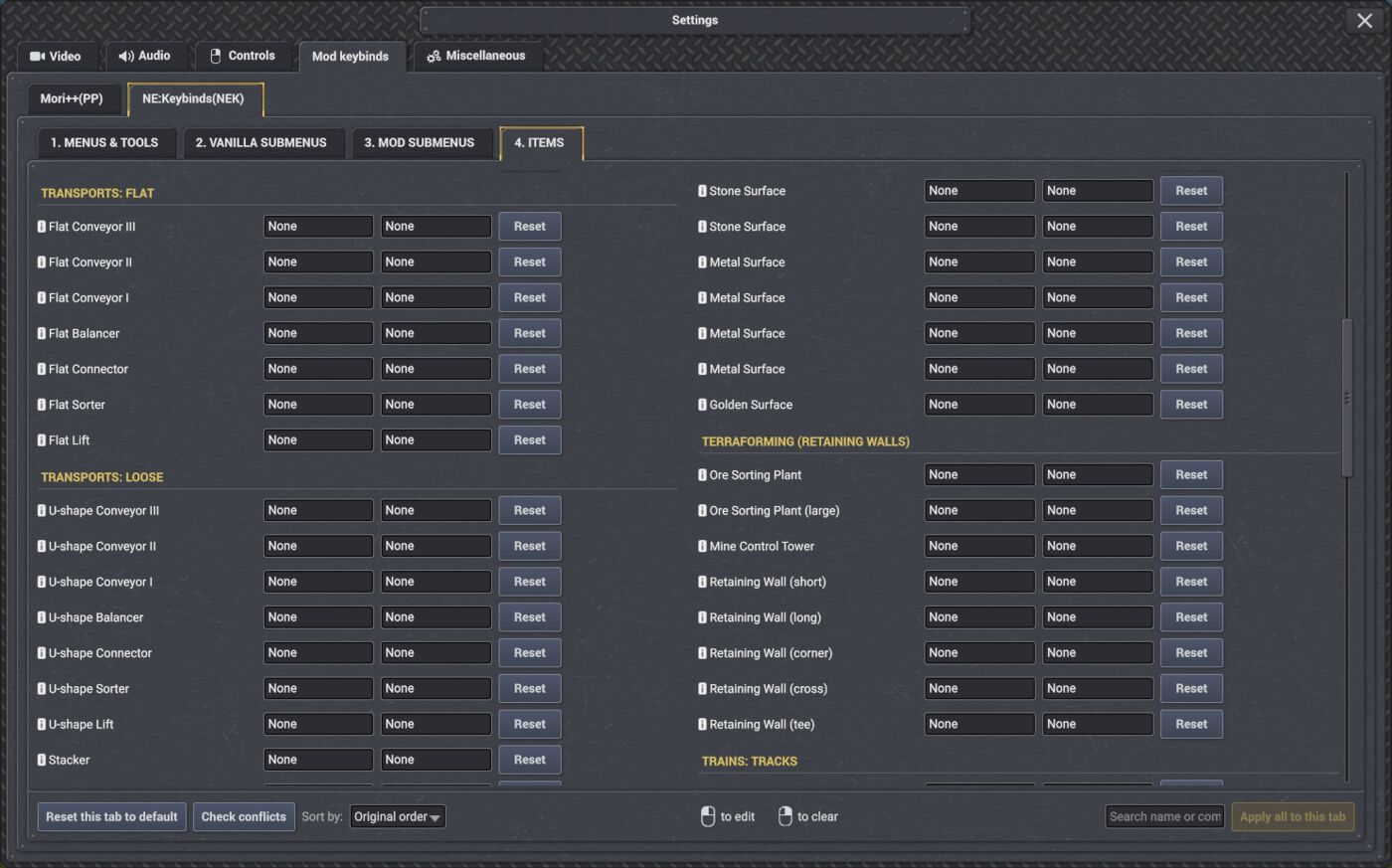
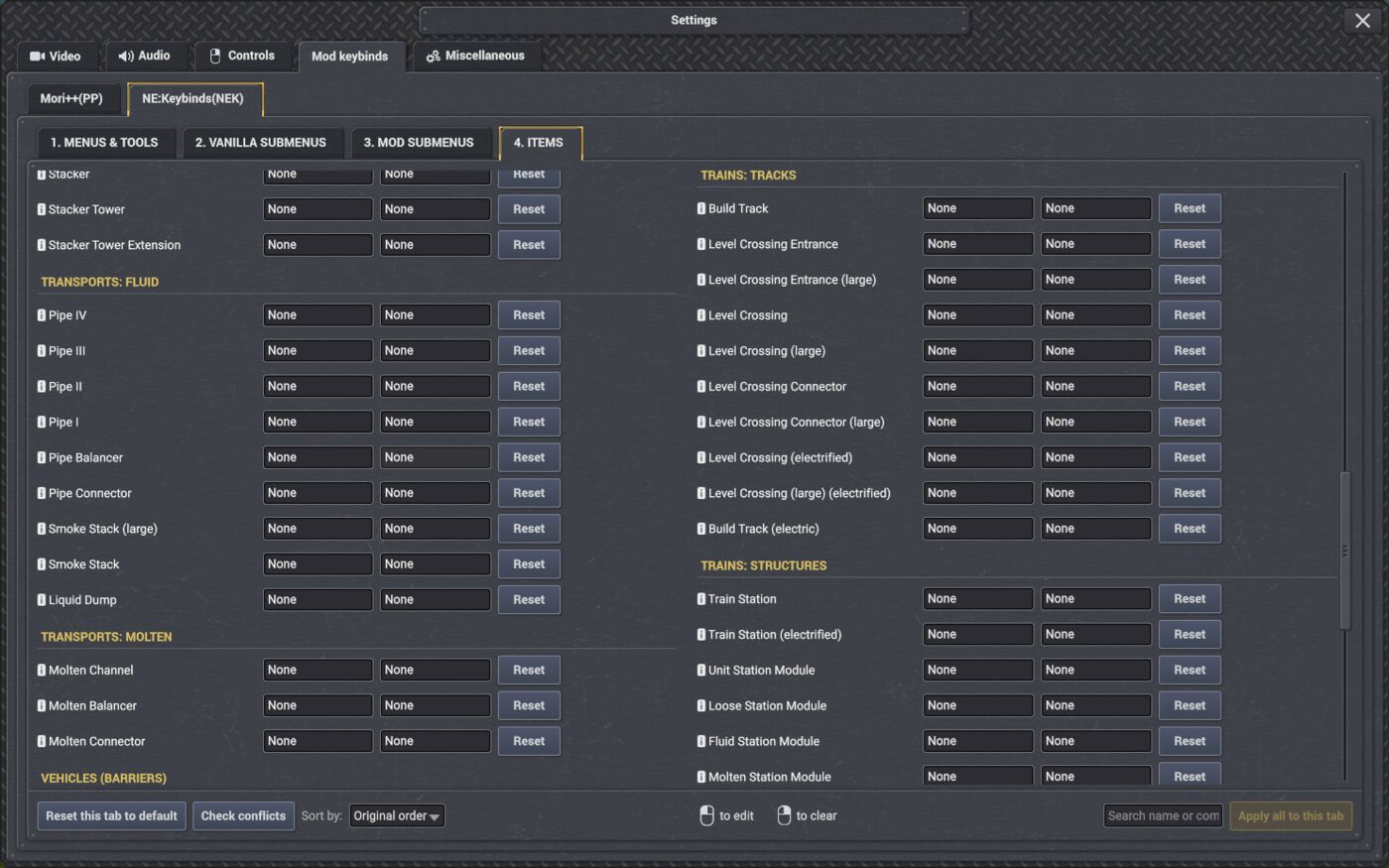
•ITEMS → Directly bind building & entity placement...
↳ Including Trees, Transports, Trains—Tracks & Stations, Storages, Surfaces, Retaining Walls, Vehicle Barriers & Towers
🧰 Modded Toolbar Binds
•NEK scans installed mods on load and attempts to add binds for any custom menus & submenus it finds.
🪟 Future Plans
•Remaining desired TOOLS → Modify Pillars & Forestry Tower Designation
•Better Tab Organization → Group each Mod's Menu + Submenus Together in one dedicated tab for mods.
•Keyword prefixes for easier [ModName] Framework searching
•Build-Mode: Fast-Swap "Bind Profiles" NEK-UI
•Curate bind names for more mods.
↳ ...and more
⚠️ Usage Notes
•NEK adds all toolbar menu shortcuts to its framework tab, even when they already exist in Controls...
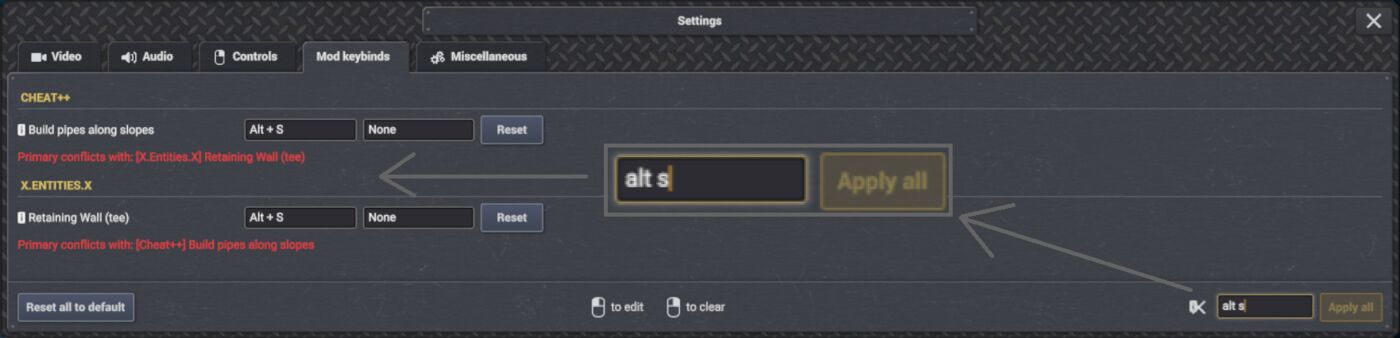
↳CAUTION!Do NOT assign the SAME [Modifier] + [Key] combo in both the vanilla Controls menu and the NE:Keybinds Tab
Example - using transport's default bind:
"Controls" NEK Tab Result T (default) CTRL+2 (default) WORKS!cleared CTRL+2 / T WORKS!T T DOESN'T WORK!T / Shift+Space CTRL+2 / Numpad2 WORKS!
✅ Conflict Resolve
•You can use Framework's SEARCH to find conflicts by BindName or [Modifier] + [Key] combos as search input. Future Framework versions will have a modname look-up & a dedicated conflicts page.
↳ Displayed results only show Keybind Framework Binds, however conflict message will still point to existing vanilla "CONTROLS" conflicts
⌨️ THE BINDS
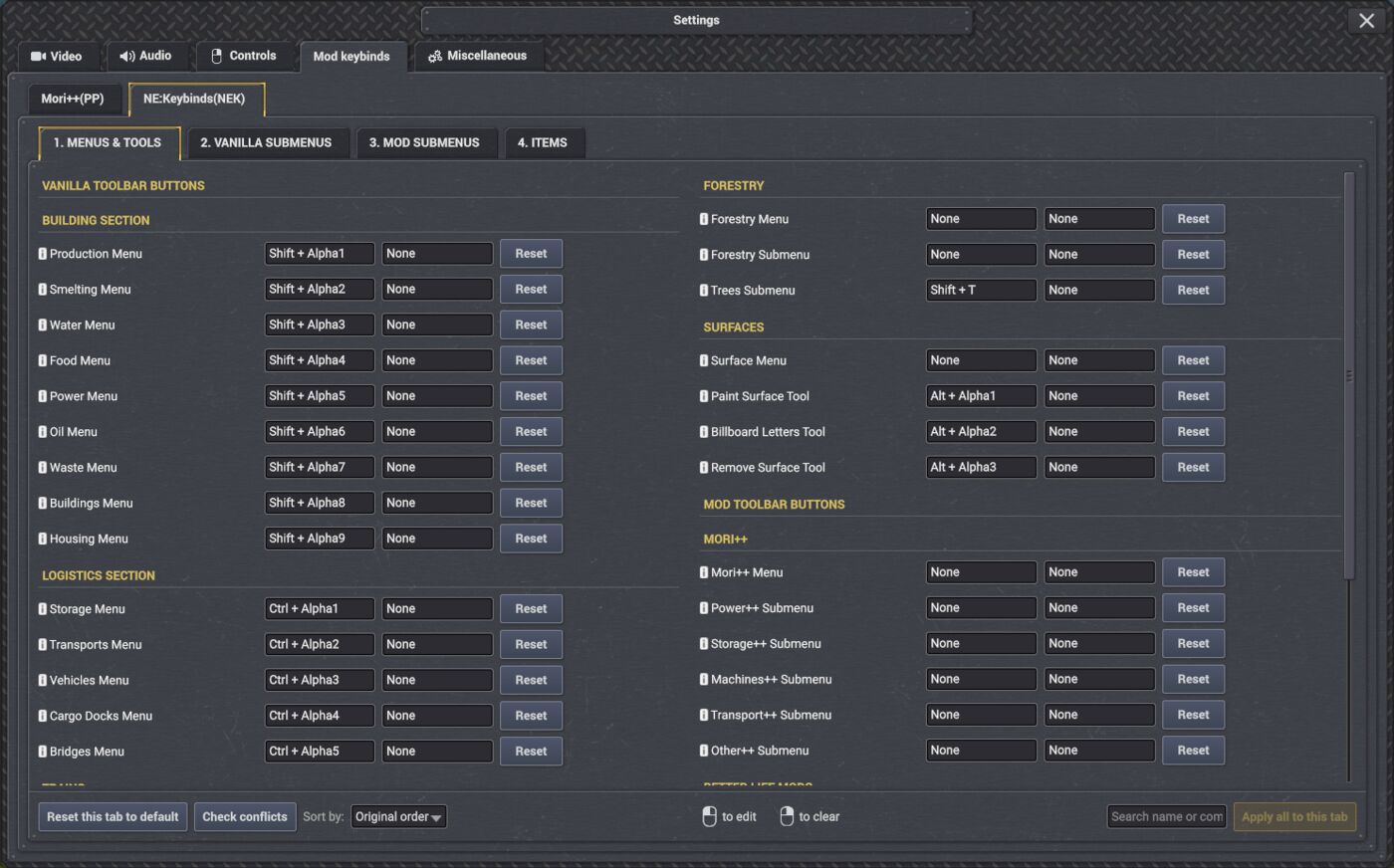
•Right click to clear unwanted defaultsBUILDINGS: MENUS—SHIFT + 1 - 9
•LOGISTICS: MENUS—CTRL + 1 - 5
•SURFACE: TOOLS—ALT + 1 - 3
•TREES: SUBMENU —SHIFT + TI will never add more defaults — Even these may be removed in future versions & replaced with a Setup helper UI.
Menus & Tools
MENU binds pull up the last viewed submenu category when used.
Submenus
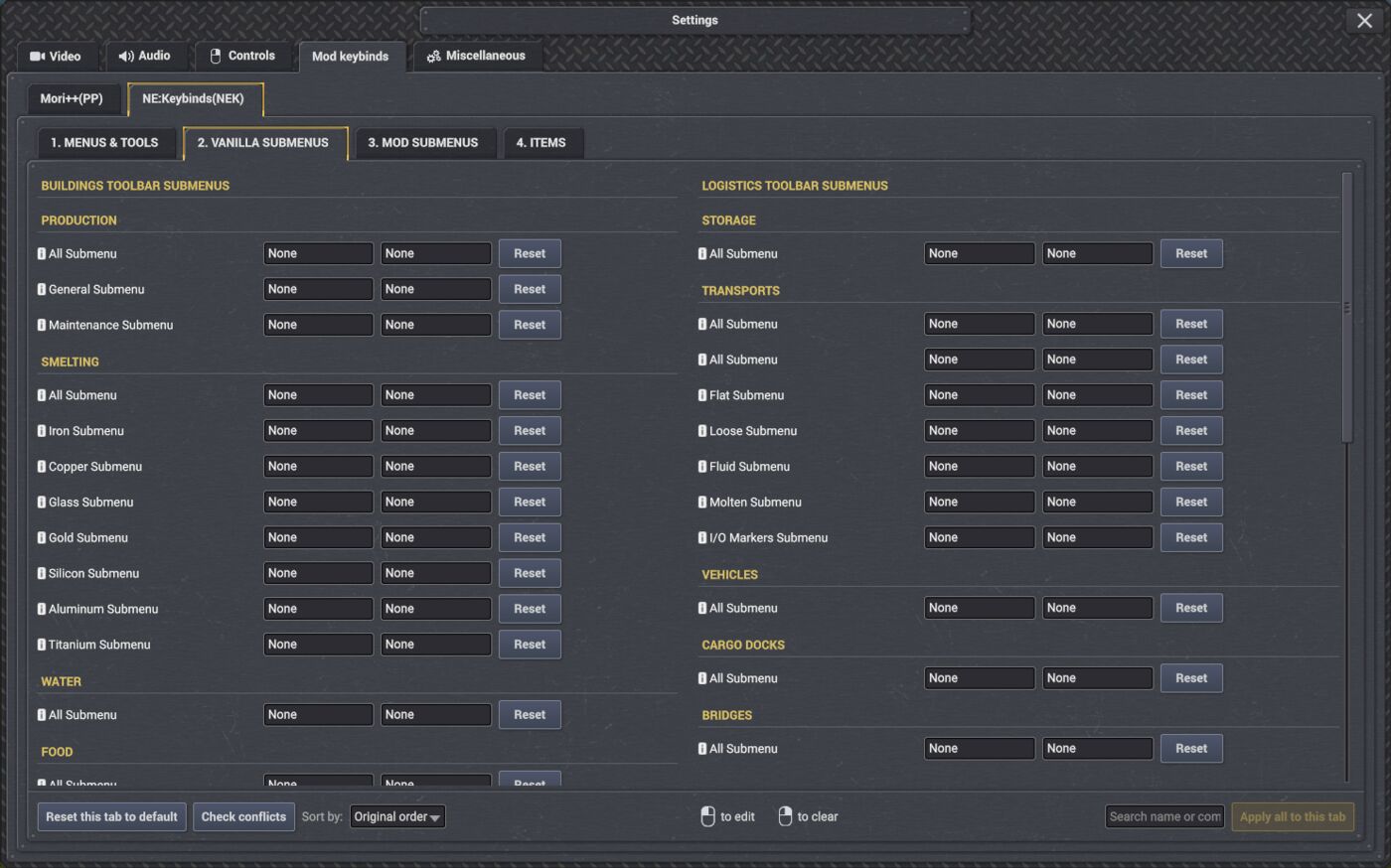
•SUBMENU binds pull up a specific subcategory view — loose, flat, iron, copper, trees etc.
↳ Using normal MENUS opens the last viewed category, while using "All" SUBMENU will force the all view every time.
↳ I decided to keep "All" submenus even when it's the only one — this hopefully keeps NEK Dynamic and future-proof.
•Since it can grow out of control, Vanilla & Modded SUBMENUS get their own framework tabs.
•I made a few exceptions and paired MENU & SUBMENUS together for Trains, Forestry, Surface & Mori++
↳ Find them in MENUS & TOOLS tab. All Other SUBMENU appear in their respective tabs, grouped under category/mod headings.
Items
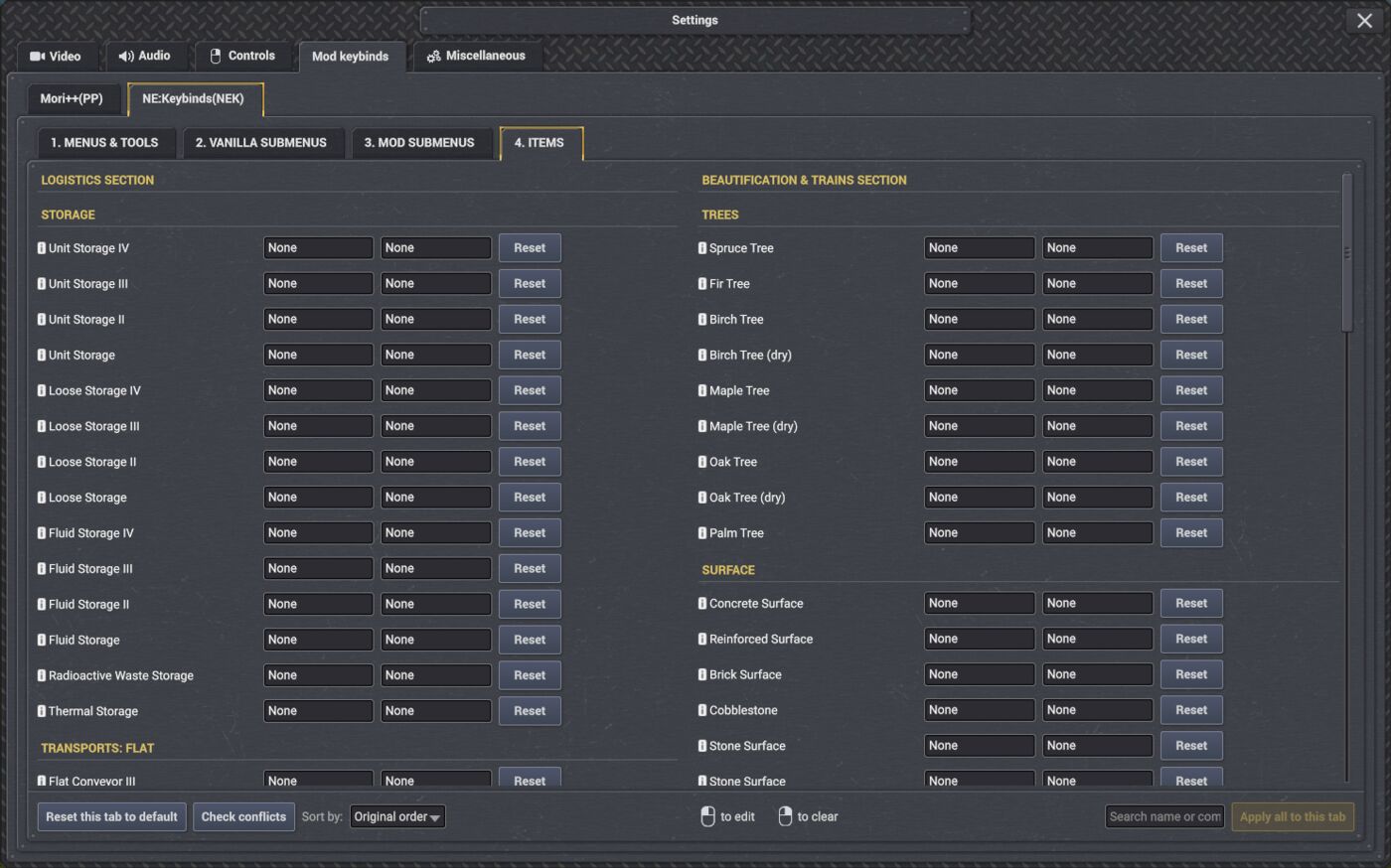
•Items are direct-placement shortcuts — they open their respective menu and ready the building or logistical item to your mouse, allowing fast placement and item switching like never before.
•To make the most of items I recommend moving your game speed off 1,2,3,4, and using all possible 1-9 combinations for items instead. This should feel more natural, while you could cycle speeds perhaps with [Space] and [Shift]+[Space]
↳ You can also use → [Modifier] + [F1 - F12] or Keypad Numbers for less frequented items or menus.
↳ But the choice is yours—use NEK for 200 Binds... or 10.
💬 Feedback
Bugs
—Suggestions—Mod support
•If using a TOOL or direct-placement ITEM bind causes glitching, locked mouse or UI states, please report! — I'm still working on making sure all special binds connect to their UI elements correctly. Consider these binds 'experimental' — yet forcefully functional.
🏅 Conclusion & Credits
•First I want to give huge thanks & credits to Moriarty for providing us with a working Keybinds.api that made this much easier to mod. Thank you for putting up with my persistent keybind suggestions & complaints.
•And, of course, much credit and appreciation for Mafi for making this awesome game to begin with.
•All SUBMENUS and planned individual item binds will always be left blank by default — I don't want to assume anyone's preferences more than i already have with the current default shift, ctrl and alt + 1-9s binds. — It's just a starter set to help you experience the toolbar in a new way, and can be easily cleared.
•ENJOY!I hope this helps somebody out there, as much as it will help me!
I built this mod primarily because i wanted fast access for Remove surface / Surface Paint / individual trees & and a few select menus when building mega-projects that often use the same menu. Long gaming sessions and repetitive clicking for toolbar navigation caused a lot of wrist strain.
Note to Mod Authors
NEK's goal is not to replace or override another mod's keybind implementation. It provides one centralized location for toolbar bindings that can be discovered at runtime. If you would prefer that your mod's toolbar bindings be excluded from NE:Keybinds, please contact me here or through the linked Discord channel. I may look into duplicate detection if it's becomes necessary.
No announcements yet.
v0.2.0
Latest| Game version | 0.8.5 - 0.8.6a |
| Released | Jul 21, 2026 |
| File size | 53.1 KB |
| License | MIT |
Changelog
v0.2.0 | 2026-07-21
* THE ONE WITH THE TREES!
* Requires Keybind Framework 1.0.1 or newer.
* Adds working Item keybinds for vanilla Trees, Trains, and Transports.
* Includes every placeable tree variant, including dry trees.
* Organizes Item controls into Storage & Transports and Beautification & Trains sections.
* Removes obsolete legacy train crossings and keeps modern crossing controls under Trains: Tracks.
v0.2.0 | 2026-07-21
v0.2.0 | 2026-07-21 * THE ONE WITH THE TREES! * Requires Keybind Framework 1.0.1 or newer. * Adds working Item keybinds for vanilla Trees, Trains, and Transports. * Includes every placeable tree variant, including dry trees. * Organizes Item controls into Storage & Transports and Beautification & Trains sections. * Removes obsolete legacy train crossings and keeps modern crossing controls under Trains: Tracks.
v0.1.9 | 2026-07-20
v0.1.9 | 2026-07-20
* Adds selected vanilla Entity keybinds confirmed to activate correctly.
* Organizes controls into four compact numbered pages.
* Adds keybind labels to supported toolbar Menu tooltips.
* Adds curated Menu and Submenu names for Vertical Balancers.
* Prevents all NE: Keybinds actions from firing while Keybind Framework is capturing a shortcut.
* Prevents Entity and Surface tool actions from firing while Settings is open.
* Keeps all newly added keybinds unassigned by default.
v0.1.8 | 2026-07-17
v0.1.8 | 2026-07-17
* Supports Captain of Industry 0.8.5 and 0.8.6 with Keybind Framework 1.0.1.
* Organizes keybinds into Main Menu & Tools, Vanilla Submenus, Mod Submenus, and Entities pages.
* Automatically registers custom modded toolbars detected when a game loads, grouping their Menu and Submenu keybinds into the matching pages.
* Adds curated naming and grouping for Mori++, Mavitto's Better Life mod series, and Programable Network.
* Keeps related Forestry, Surface, Trains, Terraforming, and Mori++ controls together for faster access.
v0.1.7 | 2026-07-17
v0.1.7 | 2026-07-17

* Requires Keybind Framework 1.0.0 or newer.
* Adds configurable Keybind Framework shortcuts for Captain of Industry toolbar menus, submenus, and selected tools.
* Includes dynamic toolbar discovery so supported toolbar menus and submenus can appear without being hardcoded.
* Organizes bind groups in vanilla toolbar order, followed by modded menus and submenus.
* Adds default Bind 1 shortcuts for common vanilla toolbar menus and high-value tools.
* Leaves Bind 2 unassigned by default.
* Safe to add to existing saves and safe to remove from saves.