Having trouble modding, "manifest file not found" SOLVED

This topic is closed (tagged ).
1 month ago

EDIT: SOLVED
given the link in the modding guide, i'm adding this edit to explain the problem and the solution for those looking for an answer, since it's buried all the way at the bottom of this thread

to solve the manifest file not found error, you need to edit the names of every file. by default download they seem to follow the format of ModName\manifest.json or ModName\manifest.json (see photos below)
remove the "ModName\" part of the file name. ex. ModName\manifest.json -> manifest.json
The game should then recognize the files

END OF EDIT

____________
EDIT 2

noticed some content mods have this same unpacking issue. if this happens you'll also need to make an "AssetBundles" folder.
i've notice this happen with DeznekCZ's wind turbine mod and Blank's Big Boy mod
nothing against them, just giving examples for other linux users
might make a guide for this

END OF EDIT 2

EDIT 3: made a guide https://coigame.com/Topic/1464/Fixing-manifest-file-not-found-on-linux

Hello, newcomer to the game and community here

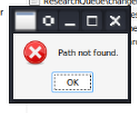
So i wanted to mod my game, specifically wanting to add Research queue (https://hub.coigame.com/Mod/17/Research-Queue) but i've been encountering a persistent problem of "manifest file not found"

image.png
I play on linux, so i understand that i may have extra issues, but given that other (presumably windows) users have had the same issue i don't think it's a proton thing
i followed the modding guide (https://hub.coigame.com/Topic/160/-Beginner-Guide-How-to-Install-Mods-in-Captain-of-Industry-), and i have the folder set up correctly
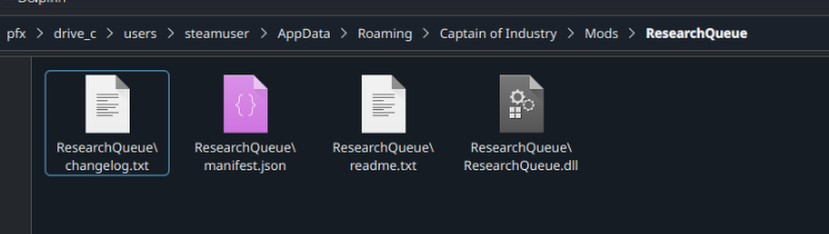
image.png
The game can even find these files when using the "show in folder" function
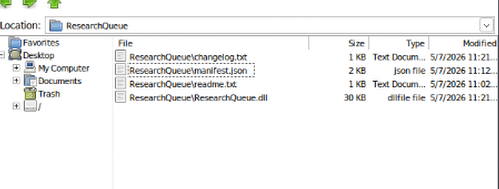
image.png
but it claims no found path
image.png
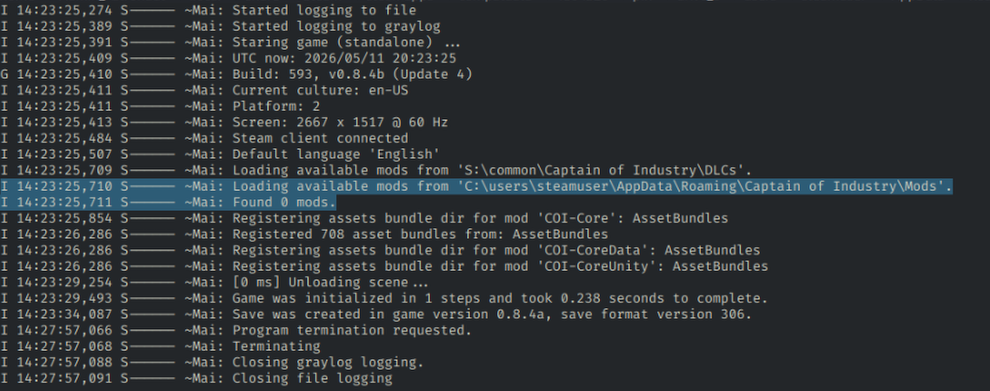
and the logs claim "0 mods found"
image.png
I have no idea what the issue could be, i'm new to the game and to linux as a whole. So i hope that not only will my problem be resolved, but that it can help others who have modding issues.

If more info is needed, feel free to ask me.

Hope this helps someone figure things out!

Edited 2 days ago
1 month ago

JustADragon wrote:

Hello, newcomer to the game and community here

So i wanted to mod my game, specifically wanting to add Research queue (https://hub.coigame.com/Mod/17/Research-Queue) but i've been encountering a persistent problem of "manifest file not found"
image.png
I play on linux, so i understand that i may have extra issues, but given that other (presumably windows) users have had the same issue i don't think it's a proton thing
i followed the modding guide (https://hub.coigame.com/Topic/160/-Beginner-Guide-How-to-Install-Mods-in-Captain-of-Industry-), and i have the folder set up correctly
image.png
The game can even find these files when using the "show in folder" function
image.png
but it claims no found path
image.png
and the logs claim "0 mods found"
image.png
I have no idea what the issue could be, i'm new to the game and to linux as a whole. So i hope that not only will my problem be resolved, but that it can help others who have modding issues.

If more info is needed, feel free to ask me.

Hope this helps someone figure things out!

I think you need to rename manually each of that file maybe, this was from AI :

I think your folder path is correct, but the files inside the folder are not named correctly.

In your screenshot, the files appear to be named:

ResearchQueue\manifest.jsonResearchQueue\ResearchQueue.dll

On Linux, the backslash \ is not treated as a folder separator like it is on Windows. It can become part of the filename. So the game is probably searching for:

ResearchQueue/manifest.json

but your actual file is named:

ResearchQueue\manifest.json

That would explain why the game says “manifest file not found” and finds 0 mods.

Your folder should look like this:

Mods/ResearchQueue/manifest.jsonMods/ResearchQueue/ResearchQueue.dll

Try renaming the files inside the ResearchQueue folder so they are just:

manifest.jsonResearchQueue.dllchangelog.txtreadme.txt

Then restart the game.

if this work, I will update my guide. I'm using Windows and never use Linux so these things are also new to me.

1 month ago

Rofinex wrote:

JustADragon wrote:

Hello, newcomer to the game and community here

So i wanted to mod my game, specifically wanting to add Research queue (https://hub.coigame.com/Mod/17/Research-Queue) but i've been encountering a persistent problem of "manifest file not found"
image.png
I play on linux, so i understand that i may have extra issues, but given that other (presumably windows) users have had the same issue i don't think it's a proton thing
i followed the modding guide (https://hub.coigame.com/Topic/160/-Beginner-Guide-How-to-Install-Mods-in-Captain-of-Industry-), and i have the folder set up correctly
image.png
The game can even find these files when using the "show in folder" function
image.png
but it claims no found path
image.png
and the logs claim "0 mods found"
image.png
I have no idea what the issue could be, i'm new to the game and to linux as a whole. So i hope that not only will my problem be resolved, but that it can help others who have modding issues.

If more info is needed, feel free to ask me.

Hope this helps someone figure things out!

I think you need to rename manually each of that file maybe, this was from AI :

I think your folder path is correct, but the files inside the folder are not named correctly.

In your screenshot, the files appear to be named:

ResearchQueue\manifest.jsonResearchQueue\ResearchQueue.dll

On Linux, the backslash \ is not treated as a folder separator like it is on Windows. It can become part of the filename. So the game is probably searching for:

ResearchQueue/manifest.json

but your actual file is named:

ResearchQueue\manifest.json

That would explain why the game says “manifest file not found” and finds 0 mods.

Your folder should look like this:

Mods/ResearchQueue/manifest.jsonMods/ResearchQueue/ResearchQueue.dll

Try renaming the files inside the ResearchQueue folder so they are just:

manifest.jsonResearchQueue.dllchangelog.txtreadme.txt

Then restart the game.

if this work, I will update my guide. I'm using Windows and never use Linux so these things are also new to me.

Yep, this worked. dropped the leading "ResearchQueue/" for every file and it loaded properly
thanks!

1 month ago

okayy glad that it worked, I'm linking this thread to my guide, in Community Troubleshooting Thread

273 Showing 14 of 4
Log in to reply.