
Utilities++
v1.3.0A height filter for belts and pipes by layer with PgUp/PgDn keybinds, plus a Vehicle Mover drag-select tool for relocating vehicles on the map, and more
- Source code
- No source provided
- Website
- https://discord.com/channels/803508556325584926/1481370238112239616
- Tags
- Quality of Life Tweaks
All MORI++ keybinds can now be rebound, and other modders can register their own keybinds too. See Keybind Framework.
6 quality-of-life tools for running a big, messy factory.
All keybinds for the mod. I highly recommend getting my Keybind Framework to solve conflicts or able to change keybinds yourself.
- Open / close the Mori++ settings window: Alt + W
- Toggle efficiency overlay: Ctrl + E
- Cycle Surplus Power modes: Ctrl + S
- Cancel Deconstruction drag tool: Shift + Alt + D
- Show one more belt/pipe level: Page Up
- Hide one more belt/pipe level: Page Down
- Show one more level from the bottom: Shift + Page Up
- Hide one more level from the bottom: Shift + Page Down
- Mass Vehicle Mover drag tool: Shift + M
- Mass Recover drag tool: Shift + R
- Cycle vehicle type for Mover / Recover: Alt + T
- Select all vehicle types for Mover / Recover: Alt + A
👁️ Belt & Pipe Height Filter
- Hide belt and pipe infrastructure by level (-20–20+), pillars included
- Toggle levels one at a time, or Show All / Hide All to clear the view instantly
- PgUp and PgDn cycle layers without opening the window
- Lets you work underneath a dense transport network without the clutter or when it's hard to diagnose a problem.
- Show / Hide Lifts, Sorters and Balancers · Hide Housing & Services · Hide Trees · Hide Offices
Compatible with Pillar Spacing & Height up to 20 +/- layers — a great mod, well worth picking up.


📐 Tools
Edit blueprints in a frozen world. When enabled, placing and demolishing complete instantly even while the game is paused — no belts or trucks shuffling items around mid-edit.
Drag Upgrade / Drag Downgrade. Drag a box to move everything inside it one tier up or down, instantly and for free. Live highlights show what's selected. Esc to exit.
Belt/Pipe Cleanup · Cancel Deconstruction

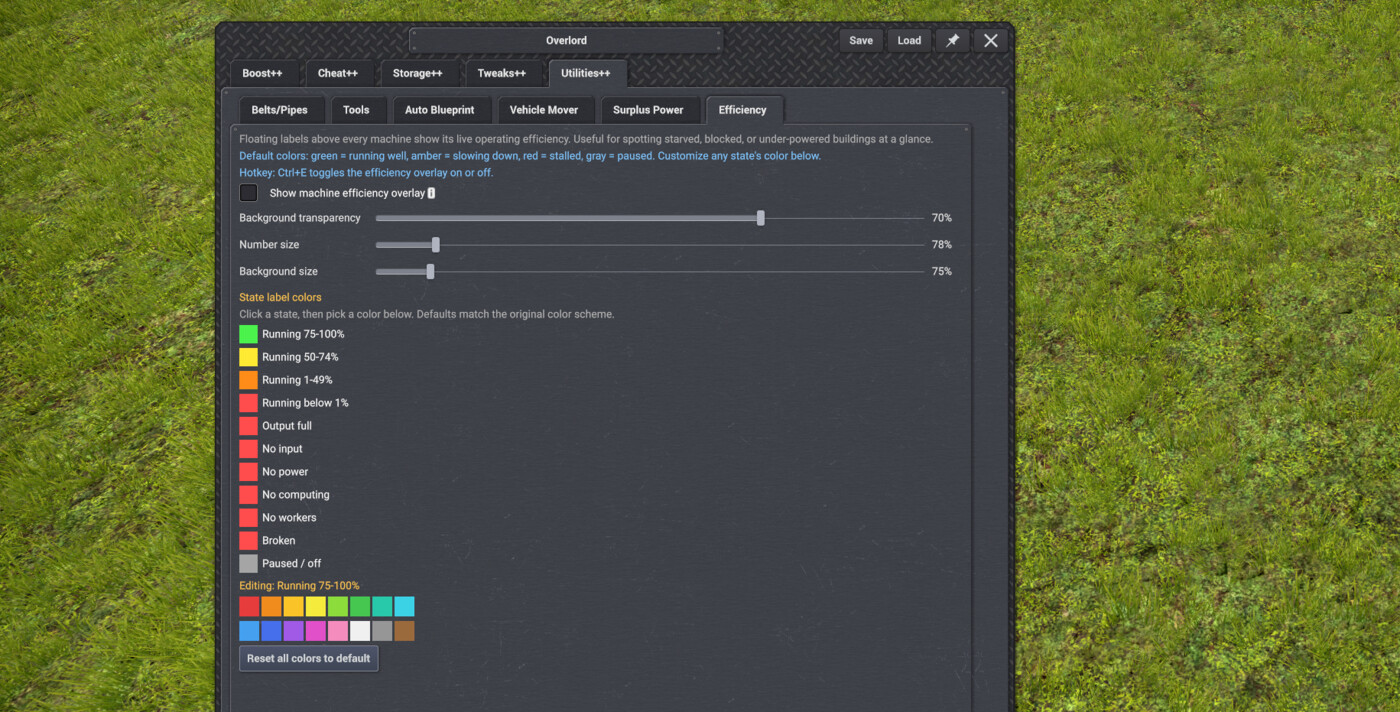
📊 Efficiency
- Toggleable overlay showing live machine efficiency, color-coded green / yellow / red
- Sliders for text size, background size and transparency
- Custom color for every machine state
⚡ Surplus Power
- Three-state global override — Default / Surplus ON / Surplus OFF — for surplus-power consumption when placing blueprints or pasting copies
- Ctrl + S cycles the modes, with a centre-screen popup confirming which one you're in
- The setting persists across saves

🚚 Vehicle Mover
- Drag-select tool for moving many vehicles at once
- Pick a vehicle type, drag a rectangle over the map, then click a destination to send them all
- Filter to one specific type, or grab everything at once
- Mass Recover

🪟 Windows
Remembers window positions across save reloads on game version 0.8.5 and older (the game does this itself from 0.8.6)
🪟 Overlord Window
Save / Load Settings Profiles · Pin · Roll-up · Resize Grip · Window Size 85%–120%
🌍 Languages
Utilities++ supports every language the base game does.
💬 Feedback
Bugs, ideas and suggestions go in the Forum tab — please post in the right category and I'll keep an eye on it.
NEW PARALLEL LINES TOOL
NEW PARALLEL LINES TOOL: BUILD SEVERAL BELTS, PIPES, MOLTEN CHANNELS OR TRAIN TRACKS SIDE BY SIDE IN ONE GO (THANKS LOADING FOR THE SUGGESTION).

- A small window opens when you build. Add up to 8 extra lines and pick each one's side, direction and gap.

- A preview shows the extra lines, and they follow every turn and curve you drag.

- Train tracks go on the outside of your turns by default, so curves stay smooth. The window tells you what to change if a turn is too tight.

- Belts and pipes can also be stacked in up to 8 layers (thanks iceball12 for the suggestion).

- Turn the tool on or off with the button in the build toolbar, Alt+D, or the checkmark in the Utilities++ Tools tab (thanks Mag for the suggestion).


Keybind Framework mod release!
Now all my mods keybinds can be rebinded and other modders can also add their keybinds to the framework. See more here Keybind Framework
v1.3.0
Latest- Game version
- 0.8.2 - 0.8.7d
- Released
- Sep 26, 2026
- File size
- 1.7 MB
- License
- CoI-Open
────────────────────────────────────────────────────────────────────────
* FIXED VEHICLE DEPOT TABS THAT COULD NOT BE CLICKED WHEN ANOTHER MOD ADDS ITS OWN TAB, LIKE LABORERS IN KAYSER'S PRE-INDUSTRIAL ERA (THANKS KAYSER AND WARRENC FOR THE REPORT).

────────────────────────────────────────────────────────────────────────
v1.2.9
- Game version
- 0.8.2 - 0.8.7d
- Released
- Sep 25, 2026
- File size
- 1.7 MB
- License
- CoI-Open
────────────────────────────────────────────────────────────────────────
* THE FUEL TABS IN THE VEHICLE DEPOT NOW SPREAD OVER SEVERAL ROWS, THREE PER ROW, SO THEY STAY READABLE WHEN MODS ADD EXTRA FUEL TYPES.

- The tabs also keep a fixed order, so they stay in the same place from one depot to the next.

────────────────────────────────────────────────────────────────────────
* NEW PARALLEL LINES TOOL: BUILD SEVERAL BELTS, PIPES, MOLTEN CHANNELS OR TRAIN TRACKS SIDE BY SIDE IN ONE GO (THANKS LOADING FOR THE SUGGESTION).

- A small window opens when you build. Add up to 8 extra lines and pick each one's side, direction and gap.

- A preview shows the extra lines, and they follow every turn and curve you drag.

- Train tracks go on the outside of your turns by default, so curves stay smooth. The window tells you what to change if a turn is too tight.

- Belts and pipes can also be stacked in up to 8 layers (thanks iceball12 for the suggestion).

- Turn the tool on or off with the button in the build toolbar, Alt+D, or the checkmark in the Utilities++ Tools tab (thanks Mag for the suggestion).

────────────────────────────────────────────────────────────────────────
* FIXED: HIDING BELTS BY HEIGHT AND HIDING BUILDINGS, OFFICES AND TREES NOW KEEP WORKING WHEN YOU LOAD ANOTHER SAVE WITHOUT RESTARTING THE GAME.

────────────────────────────────────────────────────────────────────────
* FIXED: THE COLOR PALETTE IN THE EFFICIENCY TAB NOW OPENS FOR EVERYONE. IT SHOWS RIGHT INSIDE THE TAB, UNDER THE STATE YOU ARE EDITING (THANKS VLADOVLAK FOR THE REPORT).

────────────────────────────────────────────────────────────────────────
v1.2.8
- Game version
- 0.8.2 - 0.8.7d
- Released
- Sep 22, 2026
- File size
- 1.6 MB
- License
- CoI-Open
────────────────────────────────────────────────────────────────────────
* TESTED AND WORKING ON GAME VERSION 0.8.7D.

────────────────────────────────────────────────────────────────────────
v1.2.7
- Game version
- 0.8.2 - 0.8.7c
- Released
- Sep 11, 2026
- File size
- 1.6 MB
- License
- CoI-Open
────────────────────────────────────────────────────────────────────────
* TESTED AND WORKING ON GAME VERSION 0.8.7C.

────────────────────────────────────────────────────────────────────────
v1.2.6
- Game version
- 0.8.2 - 0.8.7b
- Released
- Sep 05, 2026
- File size
- 1.6 MB
- License
- CoI-Open
────────────────────────────────────────────────────────────────────────
* THE OVERLORD WINDOW OPENS SMALLER ON 1080P SCREENS SO IT NO LONGER FILLS THE WHOLE SCREEN (THANKS MAG FOR MENTIONING IT).

- The first launch after this update on a 1080p screen resets the window to the new size and sets the scale to 95%, then your own resizing and scale choice are kept as before.

- Double-click the resize grip in the bottom-right corner to get back to the default size at any time.

────────────────────────────────────────────────────────────────────────
* FIXED MOD SHORTCUTS BREAKING AFTER A CTRL+ALT COMBO — RELEASING ALT BEFORE CTRL LEFT ALT STUCK ON UNTIL YOU ALT-TABBED (THANKS MAG FOR THE REPORT AND TESTING).

────────────────────────────────────────────────────────────────────────
* THE OVERLORD WINDOW SCALE SETTING NOW GOES UP TO 160% INSTEAD OF 120%.

────────────────────────────────────────────────────────────────────────
* TESTED AND WORKING ON GAME VERSION 0.8.7C.

────────────────────────────────────────────────────────────────────────
v1.2.5
- Game version
- 0.8.2 - 0.8.7b
- Released
- Aug 28, 2026
- File size
- 1.6 MB
- License
- CoI-Open
────────────────────────────────────────────────────────────────────────
* THE BUTTONS THAT ROLL THE OVERLORD WINDOW UP AND OPEN IT BACK UP NOW USE THE GAME'S OWN ICONS, SO THEY MATCH THE REST OF THE INTERFACE.

────────────────────────────────────────────────────────────────────────
v1.2.4
- Game version
- 0.8.2 - 0.8.7a
- Released
- Aug 25, 2026
- File size
- 1.6 MB
- License
- CoI-Open
────────────────────────────────────────────────────────────────────────
* EFFICIENCY LABELS NOW SHOW ABOVE THE ELECTROLYZER AND ELECTROLYZER II, WHICH WERE THE ONLY BUILDINGS THAT NEVER GOT ONE (THANKS WOLF FOR THE REPORT).

────────────────────────────────────────────────────────────────────────
v1.2.3
- Game version
- 0.8.2 - 0.8.7a
- Released
- Aug 21, 2026
- File size
- 1.6 MB
- License
- CoI-Open
────────────────────────────────────────────────────────────────────────
* DRAG THE GRIP IN THE OVERLORD WINDOW'S BOTTOM-RIGHT CORNER TO SET ITS SIZE, AND EVERY TAB LAYS ITSELF OUT FOR THE SIZE YOU PICK.

- Text reflows to the width you give it, so long labels and tooltips stay readable as the window grows.

- Buttons, sliders and rows stretch and line up with the window, keeping columns even at any size.

- Double-click the grip to put the window back to its default size.

────────────────────────────────────────────────────────────────────────
* THE PIN BUTTON IN THE OVERLORD TITLE BAR HOLDS THE WINDOW IN PLACE WHILE YOU WORK, SO ESC AND PICKING A TOOL BOTH LEAVE IT OPEN (THANKS MAG FOR THE REPORT).

- It starts pinned each time you load a save. Unpin it and it stays unpinned every time you open the window, until you load a save again.

────────────────────────────────────────────────────────────────────────
* THE OVERLORD WINDOW NOW HAS A SIZE DROPDOWN, 85% TO 120% IN 5% STEPS, SEPARATE FROM THE GAME'S OWN UI SCALE (THANKS VLADOVLAK FOR THE REPORT).

- Tooltips inside the window follow this size, while tooltips anywhere else in the game stay at their normal size (thanks Mag for the report).

────────────────────────────────────────────────────────────────────────
* A ROLL-UP BUTTON IN THE OVERLORD TITLE BAR FOLDS THE WINDOW DOWN TO JUST ITS TITLE BAR, AND CLICKING IT AGAIN OPENS IT BACK UP (THANKS MAG FOR THE ICONS).

────────────────────────────────────────────────────────────────────────
v1.2.2
- Game version
- 0.8.2 - 0.8.7a
- Released
- Aug 16, 2026
- File size
- 1.6 MB
- License
- CoI-Open
* The Overlord window now always shows at 100% size, whatever UI scale you play at (thanks warrenc for the report). At 125% and higher the buttons at the bottom were cut off the screen and everything needed far more scrolling.
v1.2.1
- Game version
- 0.8.2 - 0.8.7a
- Released
- Aug 15, 2026
- File size
- 1.6 MB
- License
- CoI-Open
* Lots of changes made to the translations.

- Many dead strings that are no longer in use have been removed.

- Missing strings for newer parts of the mod have been added.

- Text that was falling back to English now has its missing translations.

- Wrong translations, wording and grammar have been updated.

- If anything still reads wrong, update the translation yourself and send it to me in a DM or on the hub, and I will get it into the mod.
v1.3.0 | 2026-09-26
────────────────────────────────────────────────────────────────────────
* FIXED VEHICLE DEPOT TABS THAT COULD NOT BE CLICKED WHEN ANOTHER MOD ADDS ITS OWN TAB, LIKE LABORERS IN KAYSER'S PRE-INDUSTRIAL ERA (THANKS KAYSER AND WARRENC FOR THE REPORT).

────────────────────────────────────────────────────────────────────────
v1.2.9 | 2026-09-22
────────────────────────────────────────────────────────────────────────
* THE FUEL TABS IN THE VEHICLE DEPOT NOW SPREAD OVER SEVERAL ROWS, THREE PER ROW, SO THEY STAY READABLE WHEN MODS ADD EXTRA FUEL TYPES.

- The tabs also keep a fixed order, so they stay in the same place from one depot to the next.

────────────────────────────────────────────────────────────────────────
* NEW PARALLEL LINES TOOL: BUILD SEVERAL BELTS, PIPES, MOLTEN CHANNELS OR TRAIN TRACKS SIDE BY SIDE IN ONE GO (THANKS LOADING FOR THE SUGGESTION).

- A small window opens when you build. Add up to 8 extra lines and pick each one's side, direction and gap.

- A preview shows the extra lines, and they follow every turn and curve you drag.

- Train tracks go on the outside of your turns by default, so curves stay smooth. The window tells you what to change if a turn is too tight.

- Belts and pipes can also be stacked in up to 8 layers (thanks iceball12 for the suggestion).

- Turn the tool on or off with the button in the build toolbar, Alt+D, or the checkmark in the Utilities++ Tools tab (thanks Mag for the suggestion).

────────────────────────────────────────────────────────────────────────
* FIXED: HIDING BELTS BY HEIGHT AND HIDING BUILDINGS, OFFICES AND TREES NOW KEEP WORKING WHEN YOU LOAD ANOTHER SAVE WITHOUT RESTARTING THE GAME.

────────────────────────────────────────────────────────────────────────
* FIXED: THE COLOR PALETTE IN THE EFFICIENCY TAB NOW OPENS FOR EVERYONE. IT SHOWS RIGHT INSIDE THE TAB, UNDER THE STATE YOU ARE EDITING (THANKS VLADOVLAK FOR THE REPORT).

────────────────────────────────────────────────────────────────────────
v1.2.8 | 2026-09-22
────────────────────────────────────────────────────────────────────────
* TESTED AND WORKING ON GAME VERSION 0.8.7D.

────────────────────────────────────────────────────────────────────────
v1.2.7 | 2026-09-11
────────────────────────────────────────────────────────────────────────
* TESTED AND WORKING ON GAME VERSION 0.8.7C.

────────────────────────────────────────────────────────────────────────
v1.2.6 | 2026-09-05
────────────────────────────────────────────────────────────────────────
* THE OVERLORD WINDOW OPENS SMALLER ON 1080P SCREENS SO IT NO LONGER FILLS THE WHOLE SCREEN (THANKS MAG FOR MENTIONING IT).

- The first launch after this update on a 1080p screen resets the window to the new size and sets the scale to 95%, then your own resizing and scale choice are kept as before.

- Double-click the resize grip in the bottom-right corner to get back to the default size at any time.

────────────────────────────────────────────────────────────────────────
* FIXED MOD SHORTCUTS BREAKING AFTER A CTRL+ALT COMBO — RELEASING ALT BEFORE CTRL LEFT ALT STUCK ON UNTIL YOU ALT-TABBED (THANKS MAG FOR THE REPORT AND TESTING).

────────────────────────────────────────────────────────────────────────
* THE OVERLORD WINDOW SCALE SETTING NOW GOES UP TO 160% INSTEAD OF 120%.

────────────────────────────────────────────────────────────────────────
* TESTED AND WORKING ON GAME VERSION 0.8.7C.

────────────────────────────────────────────────────────────────────────
v1.2.5 | 2026-08-28
────────────────────────────────────────────────────────────────────────
* THE BUTTONS THAT ROLL THE OVERLORD WINDOW UP AND OPEN IT BACK UP NOW USE THE GAME'S OWN ICONS, SO THEY MATCH THE REST OF THE INTERFACE.

────────────────────────────────────────────────────────────────────────
v1.2.4 | 2026-08-25
────────────────────────────────────────────────────────────────────────
* EFFICIENCY LABELS NOW SHOW ABOVE THE ELECTROLYZER AND ELECTROLYZER II, WHICH WERE THE ONLY BUILDINGS THAT NEVER GOT ONE (THANKS WOLF FOR THE REPORT).

────────────────────────────────────────────────────────────────────────
v1.2.3 | 2026-08-17
────────────────────────────────────────────────────────────────────────
* DRAG THE GRIP IN THE OVERLORD WINDOW'S BOTTOM-RIGHT CORNER TO SET ITS SIZE, AND EVERY TAB LAYS ITSELF OUT FOR THE SIZE YOU PICK.

- Text reflows to the width you give it, so long labels and tooltips stay readable as the window grows.

- Buttons, sliders and rows stretch and line up with the window, keeping columns even at any size.

- Double-click the grip to put the window back to its default size.

────────────────────────────────────────────────────────────────────────
* THE PIN BUTTON IN THE OVERLORD TITLE BAR HOLDS THE WINDOW IN PLACE WHILE YOU WORK, SO ESC AND PICKING A TOOL BOTH LEAVE IT OPEN (THANKS MAG FOR THE REPORT).

- It starts pinned each time you load a save. Unpin it and it stays unpinned every time you open the window, until you load a save again.

────────────────────────────────────────────────────────────────────────
* THE OVERLORD WINDOW NOW HAS A SIZE DROPDOWN, 85% TO 120% IN 5% STEPS, SEPARATE FROM THE GAME'S OWN UI SCALE (THANKS VLADOVLAK FOR THE REPORT).

- Tooltips inside the window follow this size, while tooltips anywhere else in the game stay at their normal size (thanks Mag for the report).

────────────────────────────────────────────────────────────────────────
* A ROLL-UP BUTTON IN THE OVERLORD TITLE BAR FOLDS THE WINDOW DOWN TO JUST ITS TITLE BAR, AND CLICKING IT AGAIN OPENS IT BACK UP (THANKS MAG FOR THE ICONS).

────────────────────────────────────────────────────────────────────────
v1.2.2 | 2026-08-15
* The Overlord window now always shows at 100% size, whatever UI scale you play at (thanks warrenc for the report). At 125% and higher the buttons at the bottom were cut off the screen and everything needed far more scrolling.
v1.2.1 | 2026-08-14
* Lots of changes made to the translations.

- Many dead strings that are no longer in use have been removed.

- Missing strings for newer parts of the mod have been added.

- Text that was falling back to English now has its missing translations.

- Wrong translations, wording and grammar have been updated.

- If anything still reads wrong, update the translation yourself and send it to me in a DM or on the hub, and I will get it into the mod.
v1.2.0 | 2026-08-13
* Now supports game version 0.8.7a.

* The Overlord window is now the same size on every tab, so it no longer jumps in size when you switch between boost and the other mod tab.

* Efficiency tab: the colors for the floating machine status labels (Running 75-100%, Output full, No power, Broken and the rest) can now be any color you
want. Next to "Editing" there is a new color palette button — click it to mix your own color with red, green and blue sliders instead of only picking one of
the presets above, the same way group colors work in Boost++. The color you mix is applied to whichever state you are editing.
v1.1.9 | 2026-08-09
* Fixed the pin on the Overlord window doing nothing — it now actually closes the window when you open something else (a building, another window) while unpinned, and starts pinned by default the first time you open it each session. (thanks Hoochie for the report)
v1.1.8 | 2026-07-29
* Now supports game version 0.8.7.
* New Cancel Deconstruction tool in the Tools tab (Shift+Alt+D) — drag a box to call off pending demolition on everything inside (thanks rgreat for the idea).
* Hovering the "O" button on the HUD now explains that it opens the Mori++ Suite settings and shows the keybind to open it (Alt + W). Translated into all languages.
* New Save/Load buttons in the settings window — save all your Utilities++ settings to a profile and reload them in any save or new game, so you never set up everything twice.
* Renamed the Blueprint Tools tab to Tools.
* Window is now the same width as the other Overlord tabs, so it no longer changes size when you switch tabs.
* Save and Load now ask you to confirm first, so you cannot overwrite your saved profile or your current settings by accident. (thanks Mag for the suggestion)
* Added support for 13 more languages — Catalan, Czech, Dutch, Estonian, French, Hungarian, Japanese, Korean, Norwegian, Polish, Swedish, Traditional Chinese and Turkish. Utilities++ now supports every language the base game does.
* Fixed the Overlord window title, and its Save and Load buttons and their tooltips, always showing in English no matter your language.
* Fixed the floating machine status labels (Full, No Power, Broken, etc.) always showing in English.
* Fixed profile save/load status messages that stayed in English.
v1.1.7 | 2026-07-29
* Now supports game version 0.8.6b.
v1.1.6 | 2026-07-22
* Saved settings now live in a shared "Mori++ Saved settings" folder outside the mod folder, so a manual delete or a mod manager wiping the folder no longer loses them. Because of this move, all your current settings reset to default one time — set everything up again and from then on they're kept safe in that folder.
* The Mori++ HUD buttons are now one single "O" Overlord button — click it to open one window with a tab for each installed mod's settings, instead of a separate button per mod.
* Overlord now has its own keybind (Alt+W by default) to open or close it. Can be changed in Keybind Framework if installed.
* Lifts, Sorters and Balancers now have their own Show/Hide checkboxes in a column next to Buildings & Trees on the Belts/Pipes tab — independent of the Level checkboxes.
* Vehicle Mover and Mass Recover's shared vehicle type picker icons no longer show a fuel-type badge — it applies to every fuel variant (diesel, hydrogen, synthetic, battery).
v1.1.5 | 2026-07-20
* Drag Upgrade, Drag Downgrade, Belt/Pipe Cleanup, Mass Vehicle Mover and Mass Recover now switch your mouse cursor to a select-area icon while active, so it's clear the tool is on and where your drag will start.
* From game version 0.8.6 the game itself remembers window positions, so the mod's window position memory and the Windows tab now turn off automatically there. On game version 0.8.5 and older they keep working exactly as before.
v1.1.4 | 2026-07-17
* Now supports game version 0.8.6 (experimental), and remains compatible back to 0.8.4.
* Fixed a rare problem where, when using the No Pillars mod, some belt and pipe parts would be hidden even though nothing was set to be hidden. (thanks iceball12 for reporting the problem and providing the save)
v1.1.3 | 2026-06-13
* Belt & Pipe height filter (Belts/Pipes tab) now covers levels -20 to 20, up from 0-9, including underground belts and pipes (thanks Skrypt for the suggestion).
* Belt & Pipe height filter — new keybind to show/hide levels from the bottom instead of the top (Shift+PageUp/PageDown); rebindable via the Keybind Framework mod if installed.
* All keybinds can now be viewed and rebound from the Modded Keybinds tab in Settings — install the Keybind Framework mod to use it.
* All translations have been updated, thanks to Hoochie for the updated Russian translation.
* Vehicle management, Train lines management, and Train designer windows now remember their position, just like other tracked windows (thanks Skrypt for the suggestion).
* Vehicle Mover — new keybind to start Mass Vehicle Mover (Shift+M by default).
* Vehicle Mover — new keybind to start Mass Recover (Shift+R by default).
* Vehicle Mover — new keybind to cycle through vehicle types (Alt+T by default).
* Vehicle Mover — new keybind to reset back to all vehicle types (Alt+A by default).
v1.1.2 | 2026-06-12
* Surplus Power override now resets to Default on every save load or game restart, instead of keeping your last choice — avoids surprises from a forgotten Force ON/OFF setting.
v1.1.1 | 2026-06-08
* Vehicle Mover — new "Mass Recover" button. Drag a box over the map to recover every selected vehicle inside at once (sends them back to a depot). Pick a vehicle type to recover only that type, or leave it on "All Types" to recover everything in the box. (thanks Malibu2 for the great suggestion)
* Hide/Show tab — big performance fix. Hiding levels or buildings no longer drops FPS or causes micro stutters on large bases. (thanks iceball12 for the report and for providing save)
v1.1.0 | 2026-05-31
* Added a pin button to the window — pin it to keep it open (thanks Malibu2 for the suggestion).
* Added missing translations for multiple languages (thanks kukularra for reporting the missing strings).
v1.0.9 | 2026-05-29
* Blueprint Tools — new "Belt/Pipe Cleanup" button. Drag a box to delete disconnected belt/pipe leftovers in big build both for users
but the tool is mainly to help BP builders, to clean up leftovers or dead belt/pipes. Thanks for the great suggestion Kayser.
v1.0.8 | 2026-05-23
* New "Blueprint Tools" tab — when enabled, placing and demolishing complete instantly even while the game is paused, so you can edit a blueprint in a fully frozen world without belts/trucks moving items mid-edit.
Force-disables Cheat++ Instant Build (this replaces it). Thanks to Kayser for the great suggestion.
* Blueprint Tools — new "Drag Upgrade" / "Drag Downgrade" buttons. Drag a box to instantly upgrade or downgrade everything inside one tier, free. Live highlights show what's selected. Esc to exit.
* Hide tab — fixed a rare bug where entities could become un-deconstructable after loading a different save, even though they still appeared visible. (thanks Kayser for the report)
* Added Simplified Chinese translation. The mod now supports 8 languages.
* If there is anything you don't feel is right in Ukrainian language and wan't something changed/added contact SirColibris on Discord in COI server.
* Updated Ukrainian translation with proofreader refinements.
v1.0.7 | 2026-05-22
* Added Spanish, Portuguese, Ukrainian and Italian translations. The mod now supports 7 languages in total: English, German, Russian, Spanish, Portuguese, Ukrainian and Italian.
* Updated the mod thumbnail.
* Efficiency tab — new settings to set a custom color for each machine state
(no input, output full, no power, broken, paused, running). Saved per game, with reset to default.(thanks Serjevski for the suggestion)
* Efficiency overlay — item machines now show real data instead of 100% or NO IN: under-fed machines read their true %,
and NO IN only appears after 10s with no input. (thanks Serjevski for the suggestion)
* Efficiency overlay — toggle it on/off instantly with Ctrl+E, with an on-screen confirmation (like Ctrl+S for Surplus Power).
* Fixed a rare translation error in the Utilities++ window.
* Hide tab — new column with toggles to hide Housing & Services, all trees, and all office buildings. Per-save.
v1.0.6 | 2026-05-15
* Efficiency labels — fixed mirrored/inverted text when a machine is flipped during copy or placement. Labels now read correctly regardless of building orientation. (thanks Zurrke for the report)
* Efficiency labels — fixed freshly placed or copied machines showing a label with no background, or no label at all, until a save reload. Labels and backgrounds now self-heal within ~1 second of placement.
v1.0.5 | 2026-05-15
* New Efficiency tab — togglable overlay shows live machine efficiency,
color-coded green/yellow/red. Sliders for text size, background size and transparency.
(thanks neoss for the suggestion)
v1.0.4 | 2026-05-13
* New "Windows" tab — remembers where you drag building windows so the position
survives a save reload. Saved per save game. Includes a
"Clear all saved positions" button.
v1.0.3 | 2026-05-13
* Wow this is empty
v1.0.2 | 2026-05-11
* New "Surplus Power" tab — global 3-state overrides (Default / Surplus ON / Surplus OFF)
for surplus-power consumption when placing blueprints or pasting copies.
Ctrl+S cycles modes with a center-screen popup. Setting persists across saves.
Thanks to ComplexUnit for the great suggestion.
* Window widened so tab labels no longer wrap.
v1.0.1 | 2026-05-10
* Updated manifest for latest version.
v1.0.0 | 2026-05-03
* Belt/pipe height filter — toggle visibility per level (0-9) including pillars
* Show All / Hide All buttons
* PgUp / PgDn keybinds to cycle layers without opening the window
* Support for the Pillar Spacing & Height mod
* Vehicle Mover tool — select vehicle type, drag-select on map, click destination to move
* Vehicle type filter (All or specific)
No other mods depend on this mod yet.