
Adaptive Mining Tower UI
v1.0.5Customize Tower UI so it never grows too large while heavily modded.
- Source code
- No source provided
- Tags
- Quality of Life Tweaks UI
ADAPTIVE MINING TOWER UI
Helps prevent the Mining Tower UI from clipping content out of view and becoming impossible to select when heavily modded.
Supports all 21 game languages
Features
• Customize Mining Tower UI's four vanilla sections:
↪ Excavators, Trucks, Materials & Import/Export sections can be collapsed.
↪ Set 1-8 visible rows for each vanilla section.
↪ When a section's content exceeds the row limit, a vertical scrollbar appears.
↪ Hide vehicles by fuel-type, individual vehicles or currently owned.
• Collapse-all & open-all button for quick changes.
• Collapsed section states are remembered per tower UI.
• Row & Filter Settings are global and saved across saves.• Adapts when Gameplay++ is installed and adding it's own collapsible sections, so these 2 mods won't conflict.
• No save data is added. The mod can be added to or removed from saves.
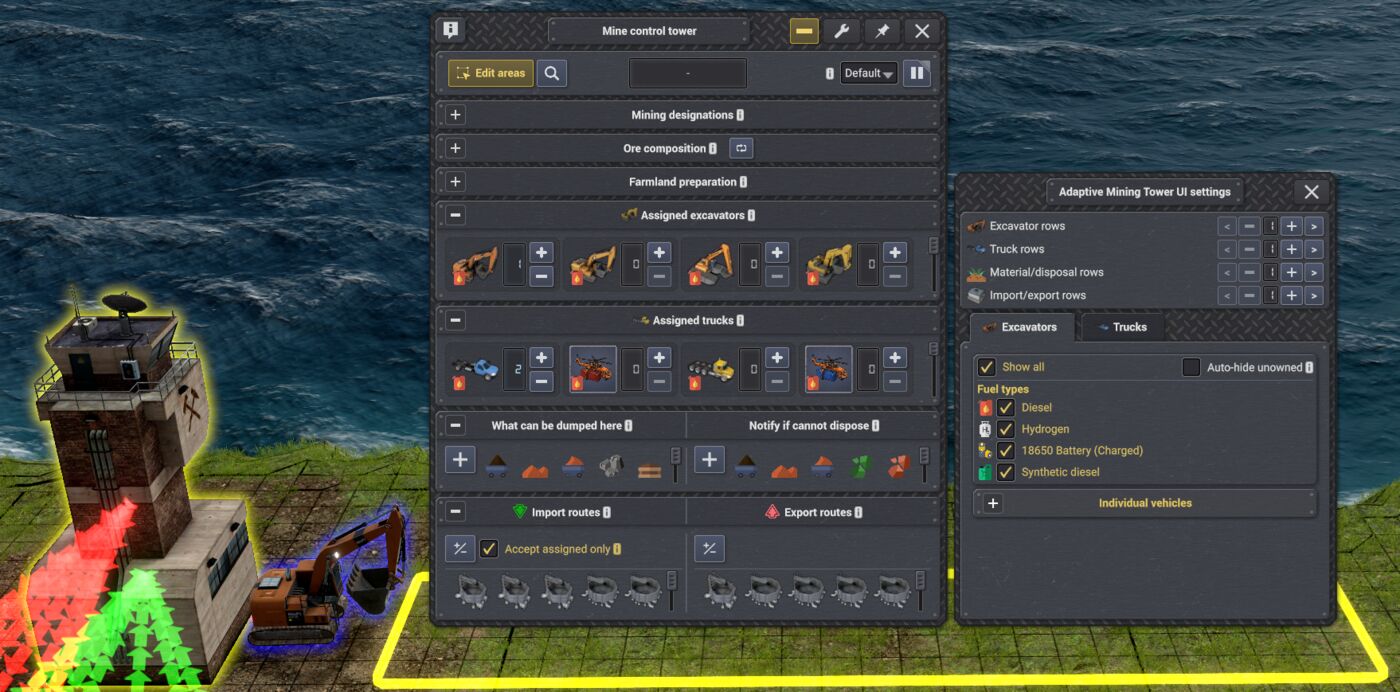
Minimum Section Size
↪ Even with many vehicles, materials & storages assigned, the UI stays a good height.
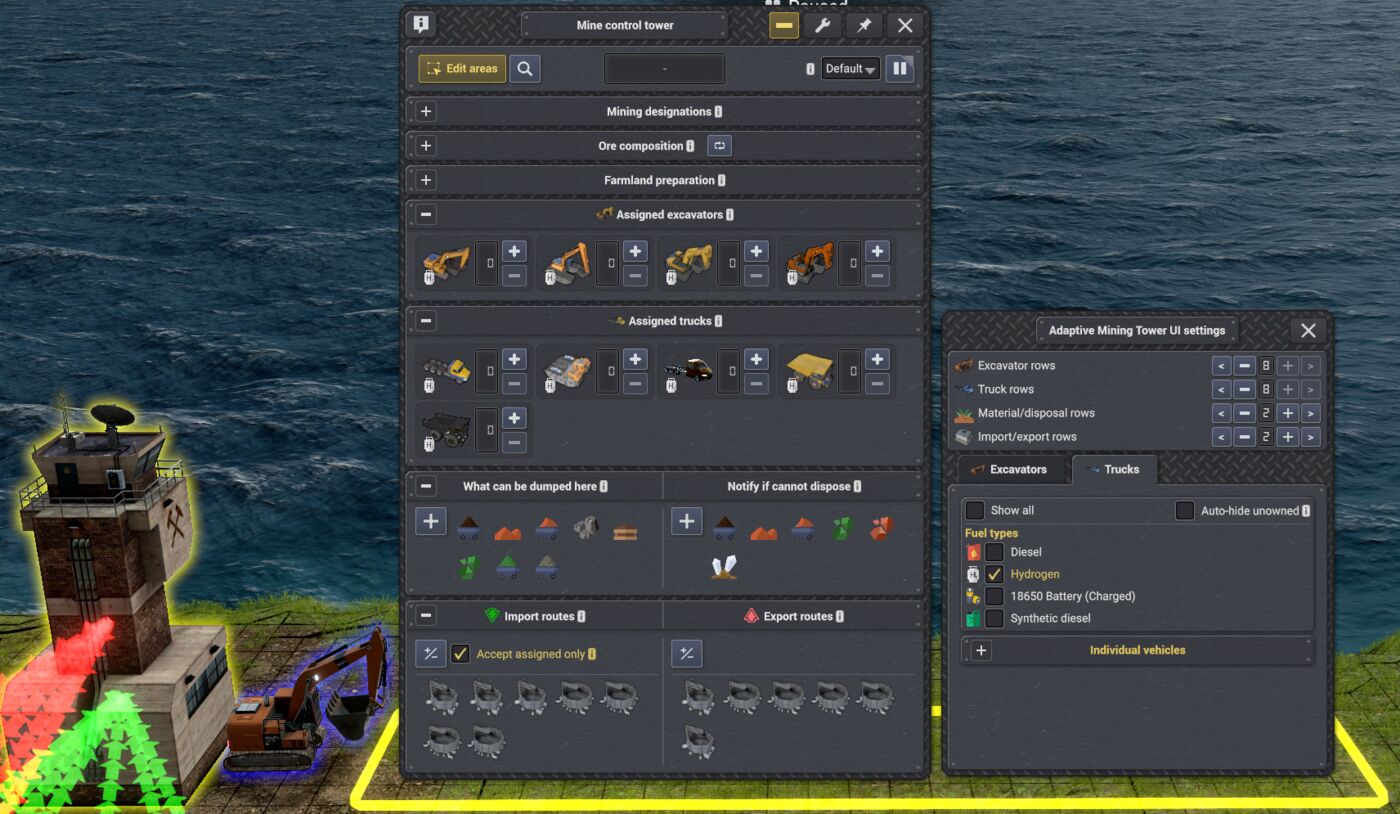
Filter by Fuel Type
↪ Useful when you're finished with diesel or previous fuel types.
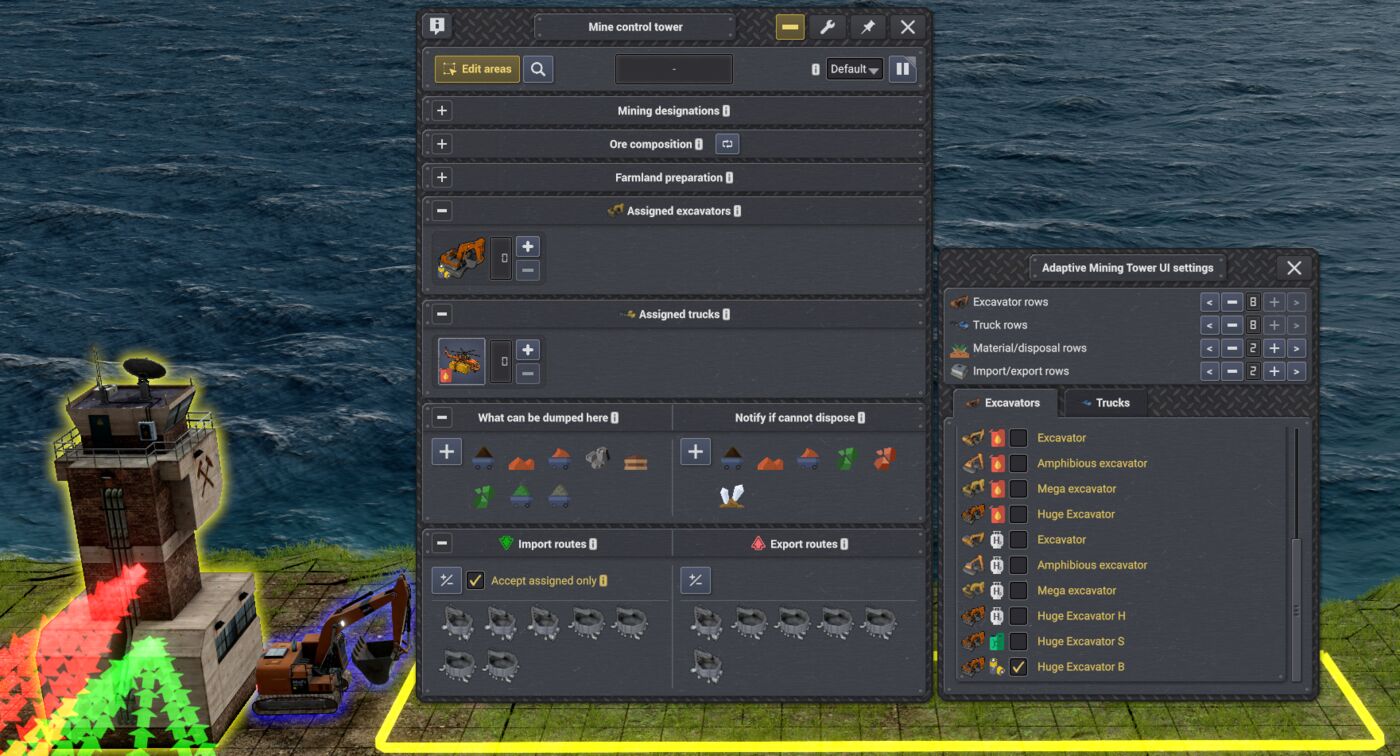
Filter by individual vehicle
• Show only the vehicles you want to see—hide unused vehicles.
• Auto-hide unowned to show only vehicles you've built
↪ If you still enjoy taller menu UI — I won't judge. Scrollbars will appear only when content exceeds row limit, so nothing gets squished.
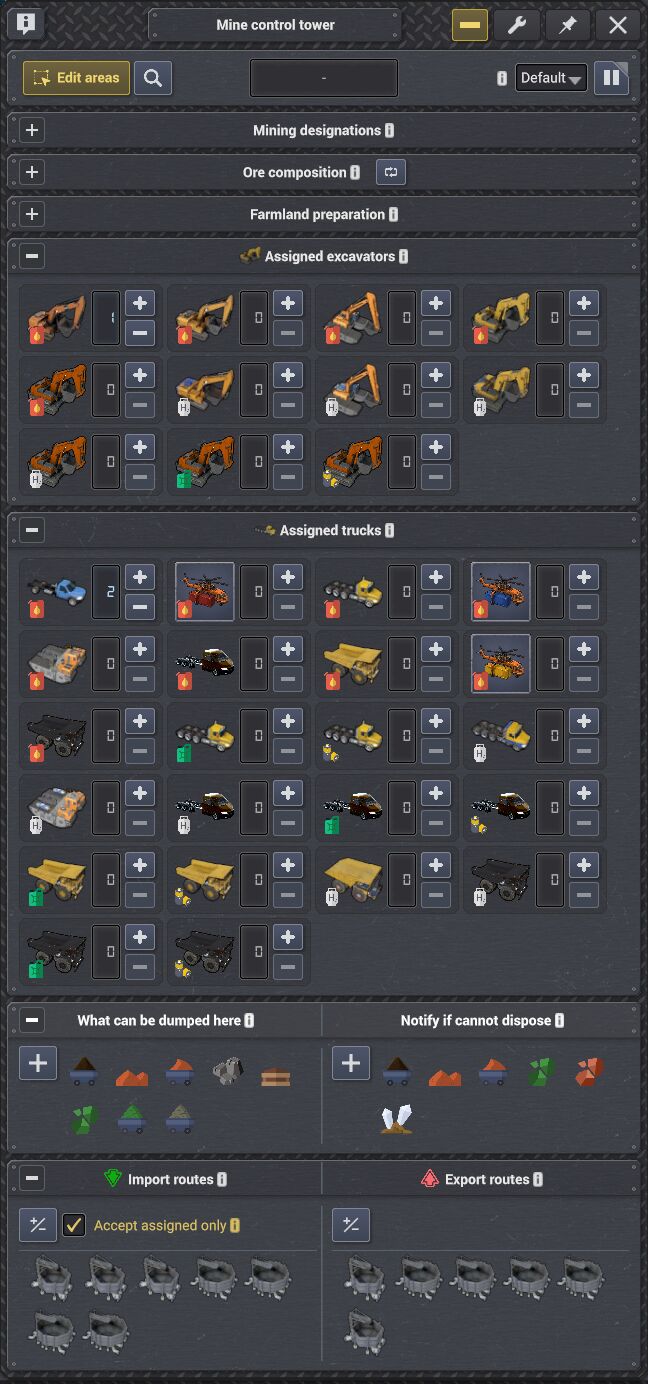
↪ No more modded Tower UI Jump-scares 😱
If you have any suggestions, found bugs, or any new mod or mod update causes new issues like double icons or clipped content, please report using the forum.
Languages
Català · 简体中文 · 繁體中文 · Čeština · Nederlands · Eesti · Français · Deutsch · Magyar · Italiano · 日本語 · 한국어 · Norsk bokmål · Polski · Português do Brasil · Русский · Español · Svenska · Türkçe · Українська
If you want to help make correction to the language files, you may past corrections here on the forum
No announcements yet.
v1.0.5
Latest- Game version
- 0.8.5 - 0.8.7
- Released
- Aug 09, 2026
- File size
- 3.1 MB
- License
- MIT
* Verifies compatibility with Captain of Industry 0.8.7.
* Adds Turkish and Traditional Chinese translations, completing support for all 21 languages available in the game.
v1.0.4
- Game version
- 0.8.5 - 0.8.6c
- Released
- Aug 04, 2026
- File size
- 3.1 MB
- License
- MIT
* Adds translations for 18 additional supported languages.
* Included languages include: Catalan, Simplified Chinese, Czech, Dutch, Estonian, French, German, Hungarian, Italian, Japanese, Korean, Norwegian Bokmål, Polish, Portuguese (Brazil), Russian, Spanish, Swedish, Ukrainian.
* Contact me on Discord or in the forums to make any needed corrections to the translations.
* Adjusted icons so they are the same in sections and settings for vehicles and import/export.
v1.0.3
- Game version
- 0.8.5 - 0.8.6c
- Released
- Aug 02, 2026
- File size
- 3.1 MB
- License
- MIT
* Fixes a load crash that could occur when no other installed mod preloaded the bundled Harmony library.
* Updates compatibility for Captain of Industry 0.8.6c.
* Cleaned up the settings menu created in first version.
* Find settings by clicking the top-right settings button in the Mining Tower UI.
* Expands features to four vanilla sections: Excavators, Trucks, Materials, and Import/Export.
* Row settings: Set a row limit; a scrollbar appears when reached, preventing further UI growth.
* Row & Filter settings are now saved between saves.
* Filter settings: Hide unused excavators and trucks from Mining Tower assignments automatically, or filter by fuel type or individual vehicle.
* Adds Collapse-all and Expand-all section buttons.
* Each Mining Tower UI remembers its previous collapse state.
* Preserves compatibility with Gameplay++ and Auto Terrain Designations without duplicating their collapse controls or taking ownership of their custom sections.
* Adds an English translation template for text owned by Adaptive Mining Tower UI while retaining the game's localized vehicle, product, and section names.
* See readme.txt for more details.
v1.0.2
- Game version
- 0.8.5 - 0.8.6a
- Released
- Jul 31, 2026
- File size
- 3.1 MB
- License
- MIT
* Fixes vehicle filters so shown vehicles are checked and hidden vehicles are unchecked.
v1.0.0
- Game version
- 0.8.5 - 0.8.6a
- Released
- Jul 31, 2026
- File size
- 3.1 MB
- License
- MIT
* Prevents heavily modded vehicle-assignment sections from stretching the tower menu until vehicles clip out of view and become unselectable.
* Makes excavator and truck assignment sections collapsible.
* Supports Gameplay++'s future collapsible vehicle sections so mods won't conflict.
* Adds independent controls for displaying one through eight rows.
* Adds a vertical scrollbar automatically when the available vehicle cards exceed the selected row limit.
* Adds a filter settings window for hiding vehicle variants you no longer wish to see or use, showing vehicle and fuel-product icons for easier identification.
* Adapts dynamically to compatible vanilla and modded vehicle types registered in the tower assignment menu.
v1.0.5 | 2026-08-09
* Verifies compatibility with Captain of Industry 0.8.7.
* Adds Turkish and Traditional Chinese translations, completing support for all 21 languages available in the game.
v1.0.4 | 2026-08-04
* Adds translations for 18 additional supported languages.
* Included languages include: Catalan, Simplified Chinese, Czech, Dutch, Estonian, French, German, Hungarian, Italian, Japanese, Korean, Norwegian Bokmål, Polish, Portuguese (Brazil), Russian, Spanish, Swedish, Ukrainian.
* Contact me on Discord or in the forums to make any needed corrections to the translations.
* Adjusted icons so they are the same in sections and settings for vehicles and import/export.
v1.0.3 | 2026-08-02
* Fixes a load crash that could occur when no other installed mod preloaded the bundled Harmony library.
* Updates compatibility for Captain of Industry 0.8.6c.
* Cleaned up the settings menu created in first version.
* Find settings by clicking the top-right settings button in the Mining Tower UI.
* Expands features to four vanilla sections: Excavators, Trucks, Materials, and Import/Export.
* Row settings: Set a row limit; a scrollbar appears when reached, preventing further UI growth.
* Row & Filter settings are now saved between saves.
* Filter settings: Hide unused excavators and trucks from Mining Tower assignments automatically, or filter by fuel type or individual vehicle.
* Adds Collapse-all and Expand-all section buttons.
* Each Mining Tower UI remembers its previous collapse state.
* Preserves compatibility with Gameplay++ and Auto Terrain Designations without duplicating their collapse controls or taking ownership of their custom sections.
* Adds an English translation template for text owned by Adaptive Mining Tower UI while retaining the game's localized vehicle, product, and section names.
* See readme.txt for more details.
v1.0.2 | 2026-07-31
* Fixes vehicle filters so shown vehicles are checked and hidden vehicles are unchecked.
v1.0.0 | 2026-07-31
* Prevents heavily modded vehicle-assignment sections from stretching the tower menu until vehicles clip out of view and become unselectable.
* Makes excavator and truck assignment sections collapsible.
* Supports Gameplay++'s future collapsible vehicle sections so mods won't conflict.
* Adds independent controls for displaying one through eight rows.
* Adds a vertical scrollbar automatically when the available vehicle cards exceed the selected row limit.
* Adds a filter settings window for hiding vehicle variants you no longer wish to see or use, showing vehicle and fuel-product icons for easier identification.
* Adapts dynamically to compatible vanilla and modded vehicle types registered in the tower assignment menu.
This mod has no dependencies.
No other mods depend on this mod yet.