
Adaptive Calendar Buttons
v1.0.7Keep your UI clean while heavily modded. Hover visibility for game speed & Modded Menu buttons in the calendar HUD.
- Source code
- No source provided
- Tags
- Quality of Life UI
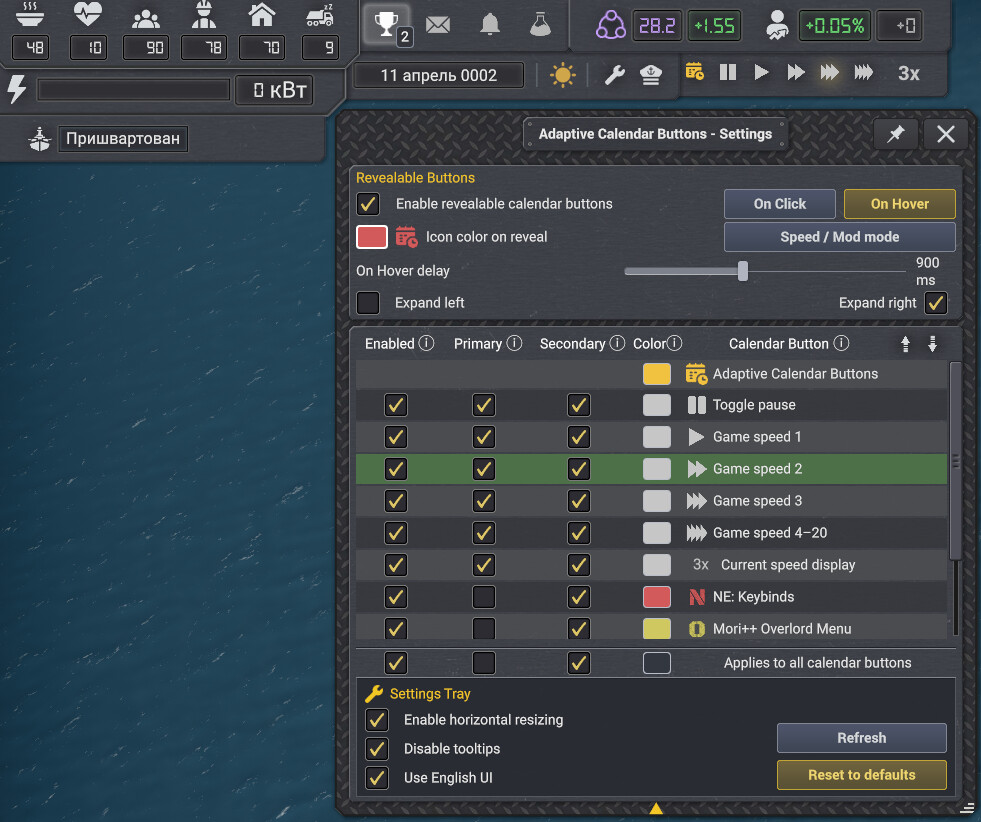
Adaptive Calendar Buttons
This mod does not add a calendar —It dynamically discovers mod-added calendar buttons and gives you mutli-view button visibility, color customization and Calendar-HUD behavior controls that help keep your calendar UI looking clean for default or custom Tweaks++ layouts.
↪ Inspired by "SexyMap" add-on for World of Warcraft.
Main Features
• Reorder calendar buttons
• Hide Buttons you only open with keybinds
• Button color pickers Presets & RGB Hex
• Click to Reveal — clicking the calendar button rotates between two sets of button views.
• Hover to Reveal — as your mouse enters the calendar HUD area, reveal all your buttons.
• Tweaks++ HUD Control compatibility
• Speed++ compatibility & optional game-speed buttons restoration
• Supports 21 Game-Languages (Translated Tooltips)
• Planned: Captain's Hat & Docked — Multi-row
Reorder
Select a button and use the arrows to Speed/Mod MODE change it's position.
↪ Top-to-bottom in the list always reads as left-to-right on the calendar HUD.
Expand Left/Right
Choose which directions the icons grow when changing to a view with more buttons. — This flips the contents of the list so it still reads left-to-right.
Bulk actions
The bottom checkmarks apply their settings to everything in that column when clicked with option to undo.
Speed/Mod Mode
One-click setup — Automatically configures icon's order and visibility settings based on your chosen Hover/Click/Expansion preferences. Game Speed buttons show on primary view, while the secondary view reveals all your mod buttons.
Speed++ conditional
Resetting to default while using speed++ while restore the hidden game-speed controls.
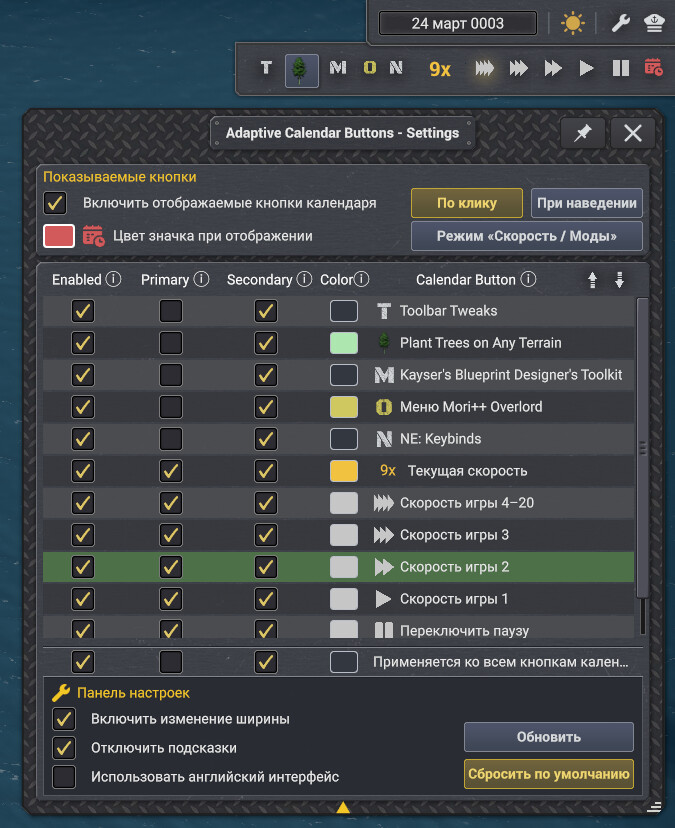
Full Language Support
Català · 简体中文 · 繁體中文 · Čeština · Nederlands · Eesti · Français · Deutsch · Magyar · Italiano · 日本語 · 한국어 · Norsk bokmål · Polski · Português do Brasil · Русский · Español · Svenska · Türkçe · Українська
If any translations are missing or badly translated you're welcome to make reports and suggestions in the forum. You can now disable Translations to revert to English Text & Tooltips from inside the bottom Settings Tray.
No announcements yet.
v1.0.7
Latest- Game version
- 0.8.6c - 0.8.7a
- Released
- Aug 19, 2026
- File size
- 2.1 MB
- License
- CoI-Keep
- Fixed a bug where calendar HUDs in non-default positions could shift horizontally after loading a world while Expand Left was enabled.
- On Click mode now remembers the last active view (Primary or Secondary) across worlds and game sessions.
- The color picker no longer closes automatically when the calendar view changes.
v1.0.6
- Game version
- 0.8.6c - 0.8.7a
- Released
- Aug 16, 2026
- File size
- 2.1 MB
- License
- CoI-Keep
FEATURES
* Expands icon color controls with a preset palette, RGB sliders, and direct hexadecimal color entry.
* Adds an adjustable On Hover delay so revealed buttons do not disappear immediately when the pointer leaves the calendar.
* Adds a collapsible Settings Tray for language, resizing, tooltip display, refresh, and reset controls. Click the gold arrow at the bottom to expand the Settings Tray.
* Adds a Use English UI option that immediately changes all Adaptive Calendar Buttons text and tooltips from the selected game language to English without requiring a restart.
* Adds independent Primary and Secondary view colors for the Adaptive Calendar Buttons control.


SPEED / MOD MODE
* Converts the Speed / Mod preset into a persistent mode that automatically adapts to On Click, On Hover, and the selected expansion direction.
* In On Click mode, Primary shows pause and game-speed controls while Secondary shows installed mod buttons.
* In On Hover mode, pause and game-speed controls remain visible in Primary while hovering reveals every enabled button in Secondary.
* Direction-aware ordering keeps speed controls nearest the calendar button when expanding left or right.
* Manually changing button order or visibility disables Speed / Mod Mode so custom layouts remain under user control.


SETTINGS & OTHER CHANGES
* Renames the configurable views to Primary and Secondary for consistent wording between On Click and On Hover modes.
* Adds optional horizontal resizing up to 130 percent.
* Adds a soft pin that prevents Escape from closing the settings window without blocking Escape from closing other windows.
* Adds an option to disable Adaptive Calendar Buttons tooltips.
* Fixes stale color swatches after undoing a bulk color change.
* Remembers the Settings Tray state and resized window dimensions globally.
* Updates all included translations for the new settings, labels, prompts, and tooltips.
v1.0.5
- Game version
- 0.8.6c - 0.8.7a
- Released
- Aug 15, 2026
- File size
- 2.1 MB
- License
- CoI-Keep
TRANSLATION REPAIR HOTFIX
* Repairs corrupted non-ASCII translation text caused by an earlier character-encoding conversion.
* Makes the editable JSON files authoritative by removing the hidden compiled translation override.
* Restores readable localized labels, menu text, and tooltips across all included languages.
* Removes obsolete legacy UI keys and adds every user-facing key used by v1.0.5.
* Replaces the remaining English placeholder labels and tooltips in every included non-English language.


SPEED / MOD PRESET HOTFIX
* On Click mode — Places speed controls in View 1 and all other enabled calendar buttons in View 2.
* On Hover mode — Speed controls remain visible At Rest, and hovering reveals all enabled calendar buttons, including the speed controls.
* Speed++'s live speed display is included with the speed controls when Speed++ is installed.
v1.0.4
- Game version
- 0.8.6c - 0.8.7a
- Released
- Aug 14, 2026
- File size
- 2.2 MB
- License
- CoI-Keep
HOVER MODE & ICON COLOR PICKERS
* Adds On Click / On Hover mode.
* On Click switches persistently between View 1 and View 2.
* On Hover shows At Rest normally and temporarily switches to On Hover while the pointer is over the calendar, and restores At Rest when it leaves.
* Both hover views are independently configurable, allowing either additive or replacement reveal layouts.
* Adds per-button color controls for game-speed icons, mod icons, and the Speed++ display.
* Adds bulk color control.
* Original icon color restores each source button's native or mod-provided coloring instead of forcing a tint.
* Separate color picker for the Adaptive Calendar Buttons control while View 2 / On Hover is active.
v1.0.2
- Game version
- 0.8.6c - 0.8.7
- Released
- Aug 13, 2026
- File size
- 2.6 MB
- License
- CoI-Keep
v1.0.7 | 2026-08-18
- Fixed a bug where calendar HUDs in non-default positions could shift horizontally after loading a world while Expand Left was enabled.
- On Click mode now remembers the last active view (Primary or Secondary) across worlds and game sessions.
- The color picker no longer closes automatically when the calendar view changes.
v1.0.6 | 2026-08-15
FEATURES
* Expands icon color controls with a preset palette, RGB sliders, and direct hexadecimal color entry.
* Adds an adjustable On Hover delay so revealed buttons do not disappear immediately when the pointer leaves the calendar.
* Adds a collapsible Settings Tray for language, resizing, tooltip display, refresh, and reset controls. Click the gold arrow at the bottom to expand the Settings Tray.
* Adds a Use English UI option that immediately changes all Adaptive Calendar Buttons text and tooltips from the selected game language to English without requiring a restart.
* Adds independent Primary and Secondary view colors for the Adaptive Calendar Buttons control.


SPEED / MOD MODE
* Converts the Speed / Mod preset into a persistent mode that automatically adapts to On Click, On Hover, and the selected expansion direction.
* In On Click mode, Primary shows pause and game-speed controls while Secondary shows installed mod buttons.
* In On Hover mode, pause and game-speed controls remain visible in Primary while hovering reveals every enabled button in Secondary.
* Direction-aware ordering keeps speed controls nearest the calendar button when expanding left or right.
* Manually changing button order or visibility disables Speed / Mod Mode so custom layouts remain under user control.


SETTINGS & OTHER CHANGES
* Renames the configurable views to Primary and Secondary for consistent wording between On Click and On Hover modes.
* Adds optional horizontal resizing up to 130 percent.
* Adds a soft pin that prevents Escape from closing the settings window without blocking Escape from closing other windows.
* Adds an option to disable Adaptive Calendar Buttons tooltips.
* Fixes stale color swatches after undoing a bulk color change.
* Remembers the Settings Tray state and resized window dimensions globally.
* Updates all included translations for the new settings, labels, prompts, and tooltips.
v1.0.5 | 2026-08-14
TRANSLATION REPAIR HOTFIX
* Repairs corrupted non-ASCII translation text caused by an earlier character-encoding conversion.
* Makes the editable JSON files authoritative by removing the hidden compiled translation override.
* Restores readable localized labels, menu text, and tooltips across all included languages.
* Removes obsolete legacy UI keys and adds every user-facing key used by v1.0.5.
* Replaces the remaining English placeholder labels and tooltips in every included non-English language.


SPEED / MOD PRESET HOTFIX
* On Click mode — Places speed controls in View 1 and all other enabled calendar buttons in View 2.
* On Hover mode — Speed controls remain visible At Rest, and hovering reveals all enabled calendar buttons, including the speed controls.
* Speed++'s live speed display is included with the speed controls when Speed++ is installed.
v1.0.4 | 2026-08-14
HOVER MODE & ICON COLOR PICKERS
* Adds On Click / On Hover mode.
* On Click switches persistently between View 1 and View 2.
* On Hover shows At Rest normally and temporarily switches to On Hover while the pointer is over the calendar, and restores At Rest when it leaves.
* Both hover views are independently configurable, allowing either additive or replacement reveal layouts.
* Adds per-button color controls for game-speed icons, mod icons, and the Speed++ display.
* Adds bulk color control.
* Original icon color restores each source button's native or mod-provided coloring instead of forcing a tint.
* Separate color picker for the Adaptive Calendar Buttons control while View 2 / On Hover is active.
v1.0.3 | 2026-08-13
RELEASE UPDATE
* Verified compatibility with Captain of Industry v0.8.7a using the live game assemblies.
* Updated the internal mod-selection thumbnail and manifest description.
* No gameplay or feature behavior changes.


MAIN HIGHLIGHTS
* Compatible with any mod that adds buttons to the native game's calendar HUD.
* Prevent button bloat with a suite of calendar-button organization settings.
* Adaptive Calendar-button — used to access settings and toggle collapsed/expanded state.
* Reorder all calendar buttons.
* Per-button visibility control while collapsed or expanded.
* A built-in settings profile button to quickly configure the calendar row with all game-speed controls while collapsed and all mod-buttons when expanded.
* Quickly restore defaults based on Speed++ or non-Speed++ installation.
* Does not alter any discovered button's original action, icon, menu(s), keybind(s), live behavior, or sourced metadata.


SUPPORT & COMPATIBILITY:
* Compatible with Tweaks++ — Expand left or Expand right modes change the calendar row-growth direction to support custom HUD layouts on either side of the screen.
* Compatible with Speed++ — Defaults when installing with Speed++ retain their hidden game-speed controls while still allowing those buttons to be re-enabled.
* Captain of Industry versions: 0.8.6c through verified 0.8.7.
* Safe to add to or remove from an existing save. — No required mod dependencies.


EXTENDED FEATURE DETAILS


ADAPTIVE CALENDAR BUTTON CONTROLS:
* Collapse mode off (DEFAULT): left-click the Adaptive Calendar Buttons button to open settings.
* Collapse mode on: left-click to collapse/expand and right-click to open settings.
* Shows the calendar icon in white while Collapsed or gold while Expanded.


Adaptive Calendar Buttons SETTINGS MENU:
* Buttons can be configured to appear while Collapsed, Expanded, both, or be completely disabled.
* Disabled buttons are hidden from the calendar-row HUD. This is useful for mod menus you prefer to access through keybinds.
* When enabled, each calendar button can be shown while Collapsed, Expanded, or both.
* If a mod provides a disable toggle for its own calendar button, that toggle removes the button from Adaptive Calendar Buttons's settings menu entirely.
* Adds independent bulk controls for Enabled, Collapsed, and Expanded, plus an in-session Undo for the latest bulk change.


EXPAND LEFT OR RIGHT MODE:
* Expands left (DEFAULT) for the common top-right calendar position.
* Switching direction reverses both the live row and settings list, so top-to-bottom always matches left-to-right.
* When Tweaks++ has repositioned the calendar, leftward mode keeps its right edge anchored while the row changes width.


GLOBAL SETTINGS & DEFAULTS:
* Remembers order, Enabled, Collapsed, Expanded, collapse mode, and expansion direction globally across every world.
* Reset to defaults restores discovered order, conditional visibility defaults, collapse mode off, Expanded state, and leftward expansion.
* Reset never changes the calendar's screen position, the settings-window position, or Tweaks++ HUD coordinates.
* Includes no per-save setup, profile system, or multiple-profile complexity in v1.0.0. Possibly planned for later versions.


DISCOVERY, NAMES & TOOLTIPS DETAILS:
* Retains settings for temporarily late-loading buttons and forgets genuinely removed dynamic buttons only after a long absence grace period.
* Refresh performs one immediate discovery scan without resetting saved preferences.
* Uses reliable mod display names when available and translated native names for recognized pause and speed controls.
* Shows original dynamically sourced tooltips only on genuine third-party Calendar Button entries in the settings list.
* Never replaces, suppresses, or disables native or third-party tooltips on the live calendar.


LANGUAGE:
* English, Catalan, Czech, German, Spanish, Estonian, French, Hungarian, Italian, Japanese, Korean, Norwegian, Dutch, Polish, Portuguese, Russian, Swedish, Turkish, Ukrainian, Simplified Chinese, and Traditional Chinese.
* In compact sections of the menu, some English words are retained while translated tooltips explain their functions or features. This is preventative for text-wrapping purposes and can be adjusted in the future.
* As always, if any language have specific issues, translation inaccuracies, or causes "broken" UI elements, a report is always appreciated.
This mod has no dependencies.
No other mods depend on this mod yet.